 Backup controller
Backup controller
Backup controller With this function a controller can be configured as a backup controller. If the primary controller fails, the backup controller automatically takes over all functions. The backup controller synchronizes itself daily with the primary controller, so that all data such as temperatures, scenes or recorded data are immediately available again. This function is currently only available for KNX systems. The image version must be at least 3.035.
The backup controller runs with the project of the primary controller. Only sending on the KNX bus is switched off. A trigger address is defined to detect a failure of the primary controller. This is sent cyclically via the Clock generator function block. The backup controller monitors this address. If the telegram does not arrive, the backup controller takes over. As soon as the trigger address is received again, sending on the KNX bus is deactivated again and the primary controller takes over all functions again.
To open the settings dialog, select Controller - Configure as backup controller in the Studio:
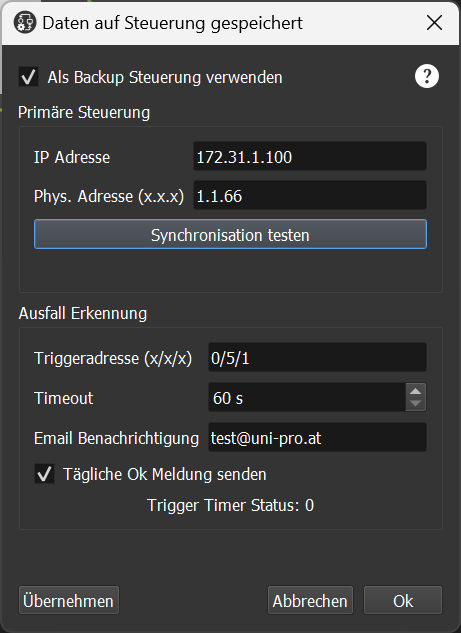
In this dialog the backup function is configured. Since the project is synchronized from the primary controller, the settings are not saved in the project but in a separate area.
Use as backup controller: Activate using the controller as a backup controller. This may only be active on the backup controller; on the primary controller this setting must remain deactivated.
IP address: IP address of the primary controller.
Phys. address: If the backup controller is active, this physical address is used instead of the one set in the KNX block.
Test synchronization: Synchronization can be tested with this button.
Trigger address: Here the address to be monitored is set. This must be a KNX address.
Timeout: Time in seconds for the monitoring. If the telegram does not arrive, the backup controller takes over all functions. As soon as the telegram is received again, the backup controller becomes inactive again.
Email notification: Email address for notification. Multiple recipients can be specified separated by a semicolon ";". A mail is sent when the trigger fails, when the trigger is received again, or when an error occurs during synchronization.
Send daily OK message: With this option a daily OK message is sent by the backup controller. This ensures that the backup controller is also operational. On the main controller the function block "Monitor network devices" can additionally be used to monitor the backup controller as well.