 Diagnostics
Diagnostics
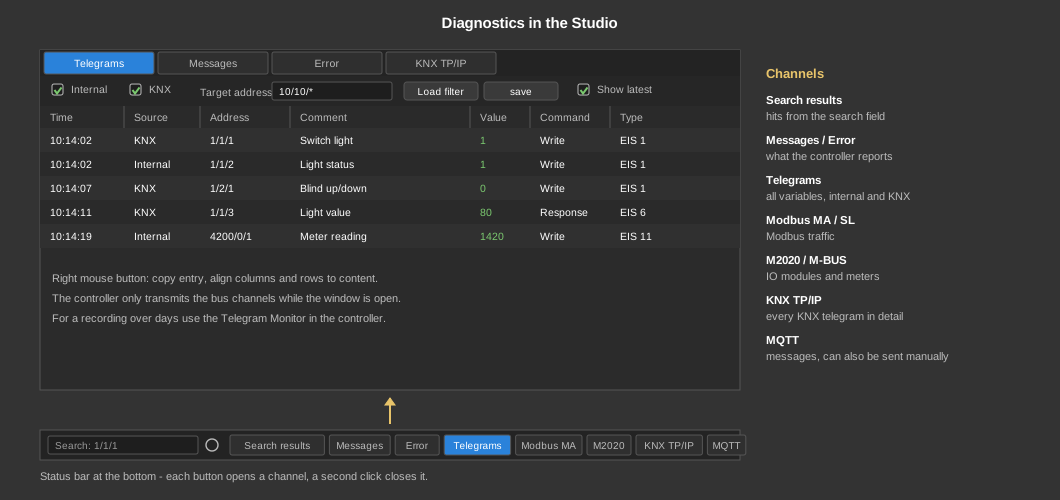
Diagnostics The diagnostics show in the Studio what is happening in the controller and on the connected bus systems. They are opened via the buttons in the status bar at the bottom of the Studio; each button opens its own channel in the diagnostics window. Clicking the button again closes the window.
The controller only transmits the bus system channels while the Studio is connected and the respective channel is open. When the channel is closed, the Studio switches the transmission off again. For recording without a connected Studio, use the Telegram monitor.
| Search results | Result of the search in the search field on the left of the status bar (e.g. an address such as 1/1/1, a text or a condition such as "Update cyclically > 0"). The gear button next to the search field sets where to search (function blocks, control elements, comments, addresses, parameters). See also Search in project. |
| Messages | Messages of the controller with date, time, service and message text. The button shows the number of messages. |
| Error | Error messages of the controller with date, time, service and error text. The button shows the number of errors. |
| Telegrams | All telegrams of the addresses, KNX and internal, with timestamp, physical address, destination address, comment, value, service, command (read, response, write), data type, hex data and length. Filters: show or hide internal and KNX, physical address, and lists of destination addresses to show or hide (drag addresses from the address window or enter addresses, * as wildcard, e.g. 10/10/*). Filter settings can be saved and loaded again. |
| Modbus MA / Modbus SL | Data traffic of the Modbus master or the Modbus TCP slave with direction (I/O), source, timestamp and data in hex. For the Modbus master you can filter by Modbus ID, register, function and source. |
| M2020 | Data traffic to the M2020 IO modules (direction, timestamp, data in hex). |
| M-BUS | Data traffic to the M-Bus meters (direction, timestamp, data in hex). |
| KNX TP/IP | Every KNX telegram of the onboard interface and the IP gateways in detail: direction (received, sent, acknowledgement), source, timestamp, telegram length, command, physical address, destination address, data length, data and telegram in hex. Filters: destination address (several separated by semicolons, e.g. 1/2/3;1/2/4), physical address and source. Clicking a row shows the telegram details. |
| MQTT | Incoming and outgoing MQTT messages with direction, timestamp, topic and value. "Send message manually" sends a message with topic, value and optionally retain directly, e.g. to test a device. |