 Project settings - Distributed project
Project settings - Distributed project
Project settings - Distributed projectA project can run on several controllers. Each controller only executes the program pages assigned to it. This allows, for example, the heating of an outbuilding to run on the controller located there - if the main controller fails, it keeps working on its own.
It remains one project. It is written to one controller and passed on from there to the others. The app connects to any controller and displays and operates the entire installation.
If a project contains no controller list it runs on a single controller as before. Existing projects are not affected.
Introduction as a presentation: Distributed project - simply explained - function and benefits on a few slides, easy to follow for non-technical readers too. Suitable for presenting to customers (arrow keys to browse, F for full screen).
Every controller involved is entered in the table:
Every controller in the group carries a number from 1 to 16. This number is the actual reference within the project - not the address. The address only says where the controller can be reached; the number says who it is. If a controller moves to a different network its address changes - the assignment “page X runs on controller 2” is not affected by that.
The number is used in three places:
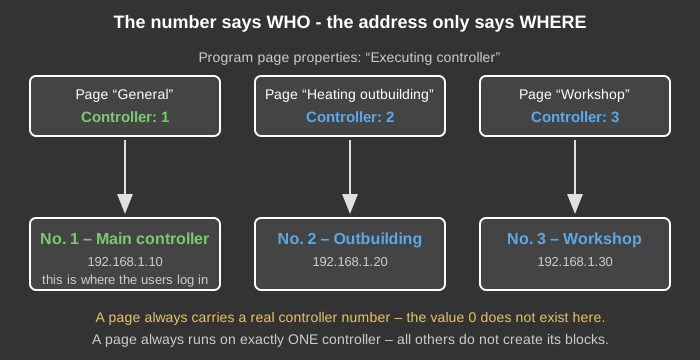
The value 0 has only one meaning: a device that has not been given a number yet. It does not occur on a program page. An existing project still carries 0 on every page - when the controller list is created this becomes the number of the main controller, so that everywhere states what applies.
A controller that has not been given a number executes nothing in a distributed project. This is the safe rather than the convenient choice: if it started as a main controller instead, there would be two of them and every command would be executed twice.
The controllers connect to each other by a fixed rule: each one only calls the numbers that are higher than its own. This gives exactly one connection between any two controllers, without anything having to be configured.
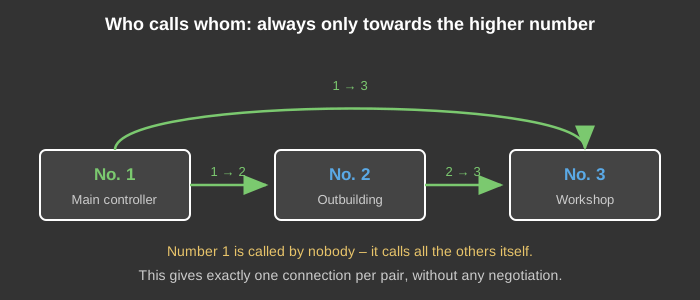
This rule has a consequence that becomes important further down at the backup controller: the controller with the lowest number is called by no other. It calls the others itself.
The assignment is made in the properties of the program page under Executing controller.
A page always runs on exactly one controller. All others do not even create the blocks of that page. If the same logic ran more than once, the controllers would overwrite each other's outputs.
This also gives each controller its own KNX interface: the KNX interface block is simply placed on a page belonging to that controller. The same applies to Modbus, MQTT and all other device-dependent blocks.
A page that is not executed by the currently connected controller can be recognised in the editor: a note naming the responsible controller is shown at the top left, the block titles are red and the connection lines are not drawn in green.
For recordings as well, each entry selects which controller records it.
Recording works correctly no matter which controller you are connected to. The values are synchronised within the federation, so the responsible controller sees the value even when it originated on another controller.
But they can only be viewed there. The recorded data lies in the database of the controller that records it and is served only by that controller. Studio and APP always ask the controller they are currently connected to. To look at a history you therefore have to connect to the controller that records it. The same applies to deleting data and to the telegram monitor.
This also affects blocks that record by themselves - for example Block statistics or the energy monitor. They sit on a program page, run on that page's controller and store their data there.
This has to be decided when planning the project:
The controller column of the recording list always shows which controller writes which entry.
A drawn connection between two function blocks is not an address, it is a wire inside the program. It only comes into existence when both blocks are created on the same controller.
However, each controller only creates the blocks of the pages assigned to it. If a wire connects two pages that run on different controllers, the other end is missing on each of them - the connection therefore exists on neither controller. Nothing is reported, and during operation you only notice it because a value never arrives.
Drawn connections across controller boundaries are therefore not possible. Within one controller - that is, between pages executed by the same controller - they are allowed as usual, including across pages.
Use an internal address instead: create an address, link the output of one block and the input of the other to it, and remove the drawn connection. The value of an internal address is synchronised between all controllers of the group and therefore also reaches the other controller.
This has a second advantage: an address can be found in the address list. Where a value comes from and where it goes is visible without searching through several pages.
Every controller needs its own number. It is stored on the device and not in the project - otherwise replacing a device would mean rebuilding the project. Connect to the controller concerned, enter the number in the field This controller is number and confirm with Set number. The program of the controller is then rebuilt.
In a distributed project a controller without a number executes nothing and reports this accordingly. This is the safe rather than the convenient choice: if it started as a main controller instead, there would be two of them and every command would be executed twice.
There is a more convenient way through the list itself: every row has a Number... button. It opens a menu with Set number x, Clear number and Clear number and remove from the federation. The request goes through the controller the Studio is currently connected to and is passed on from there to the controller concerned - so you no longer have to connect to each controller separately. If a controller is currently unreachable, the entries remain visible but are disabled.
If a controller is to leave the federation, clear its number and remove its row from the list. Program pages that pointed to it are switched to the main controller, otherwise no controller would execute them any more.
The project is written to one controller as usual. That controller then passes it on to all others automatically.
Every transfer increases the project state by one. All controllers of a project must show the same number. A lower number means that this controller was not reachable when the project was written - it detects this the next time it connects and fetches the project itself.
The Distribution column shows the result: accepted, already up to date, not reachable or failed. This is not a self-report by the controller but is verified against the project state it reports.
The same software version must run on all controllers of the network. The Version column shows the version each controller reports. When the software is updated, all controllers of the network must therefore be updated one after the other.
If the address of a controller is changed, it must also be reachable at the new address - otherwise the project does not arrive there and this one controller has to be written to manually.
The controllers exchange their internal addresses with each other. This allows the app to connect to any controller and still display the entire installation.
The settings of the operating elements - schedules, setpoints, presence simulation - also apply jointly on all controllers. If a clock is changed in the app it does not matter which controller the app is connected to: the change arrives where the block runs and is then present on every controller. If a controller was unreachable while the change was made, it fetches the newer state the next time it connects. This requires the clocks of the controllers to be reasonably in step (time server).
Operating data of the executing block - meter readings, running times, minimum and maximum values, service credentials - deliberately stay on their controller.
Every controller of the federation is monitored, and the times are fixed - there is nothing to configure. A controller whose failure nobody needs to notice does not belong in the federation.
| What | Time |
|---|---|
| Interval between life signs | 10 seconds |
| Shown as “not reachable” | after 2 missing life signs (20 seconds) |
| Failure is reported | after 6 missing life signs (60 seconds) |
Every controller sends a life sign to its partners every 10 seconds. If it is missing twice, the state column already says “not reachable” - but the failure is only reported once six checks in a row pass without a life sign. A restart or a brief network disturbance therefore does not trigger a message.
If the connection is closed cleanly, this shows in the state column at once. The 60 seconds until the message still apply - they are counted from the last life sign, not from the disconnect. If the controller returns before that, nothing is reported.
The message is always sent by the reachable controller with the lowest number; if that one fails itself, the next takes over. The message text therefore always names the reporting controller.
The message goes through the message centre of the project - recipients, priority, quiet times and escalation groups apply as usual. If there is no message centre, it is sent directly as e-mail and push to the recipients entered here. Test message lets you check the path without switching off a controller.
The Distributed project status block is available in the program. For each controller it reports whether it is connected, its state and the seconds since the last message - so the program itself can react, for example block a function or set a collective fault.
If a controller is replaced, the order is:
After that it is part of the group and fetches future project states by itself.
To do this, delete its row from the list. The other controllers then no longer call it, no longer monitor it and no longer synchronise any values with it. Program pages pointing at this controller are switched to the main controller in the process.
This cannot be forgotten. If a program page or a recording points to a number that is not (or no longer) in the list, the main controller executes it. This is checked on every program build, not only when removing a row in the dialog - so it also applies when the list was changed by other means. The controller writes a line to the log, and in the Studio the hint appears at the top of the page concerned. The next Apply in the dialog corrects the assignments permanently.
Falling back to the main controller is the safe choice: without it the part concerned would run on no controller at all - and silently.
What happens to the device itself depends on the goal: if it is to run the whole installation on its own again, write a project without a controller list to it. If instead it is left running with the old project and its old number, it keeps executing “its” pages - but then unnoticed and without synchronisation.
Both connect controllers, but they solve different tasks:
Between the same two controllers, only one of the two is used. If a federation and a bridge are set up at the same time, a circle appears: the federation passes a value to the partner controller, the bridge passes it back, and the two paths do not recognise each other - each marks forwarded telegrams in its own way. A single telegram can then circle between the two controllers indefinitely.
Using both side by side in the same project is harmless as long as the bridge leads to a controller that is not part of the federation. A federation may well connect a foreign installation through a bridge.
Both concepts complement each other and solve different problems.
The distribution itself is already a safeguard. If one controller fails, the others keep running - each executes its own pages and does not depend on the failed one. What is missing are only the functions of that one controller.
The backup controller fills exactly that gap: it secures one particular controller and takes over its tasks if that one fails. For this it is given the same number as the controller it secures.
While on standby it does not join the group. This is necessary: if both announced themselves under the same number, a partner controller would no longer know which of the two is meant - and a reply could end up at the silent backup controller instead of the active one. When it takes over, it joins by itself.
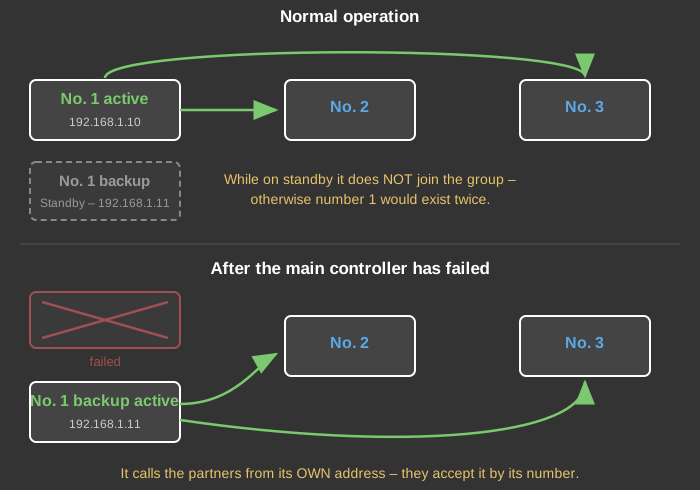
When taking over, the backup controller keeps its own IP address. The controller list, however, holds the address of the secured controller - and that one no longer answers.
As long as the secured controller has the lowest number, this does not matter: it is called by no other controller, it calls the others itself. The backup controller therefore establishes the connections from its own address, and the partners accept it by its number. The group re-forms on its own.
If a controller with a higher number were secured instead, the controllers with lower numbers would keep calling the old address, which no longer answers, and would never find the takeover.
Therefore, for the time being: the backup controller secures the controller with the lowest number. Give the main controller that the users connect to the number 1 - then this condition is met.
Nothing changes for the app and the Studio: two separate connections are created there for the main and the backup controller as usual, and the user switches to the second one if a failure occurs.
The same software version must run on all controllers involved.