 Block Set date/time
Block Set date/time
Block Set date/timeThis control element shows the time of the controller and sets date and time there – for instance if the controller cannot get its time from the internet. Switching clocks and all time dependent functions follow this time.
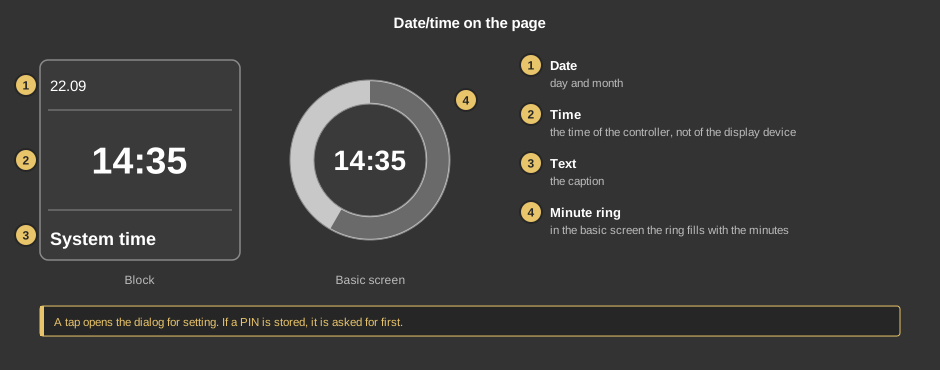
A tap opens the dialog for setting. If a PIN is stored, it is asked for first, in every view; a wrong entry shows “Wrong password”.
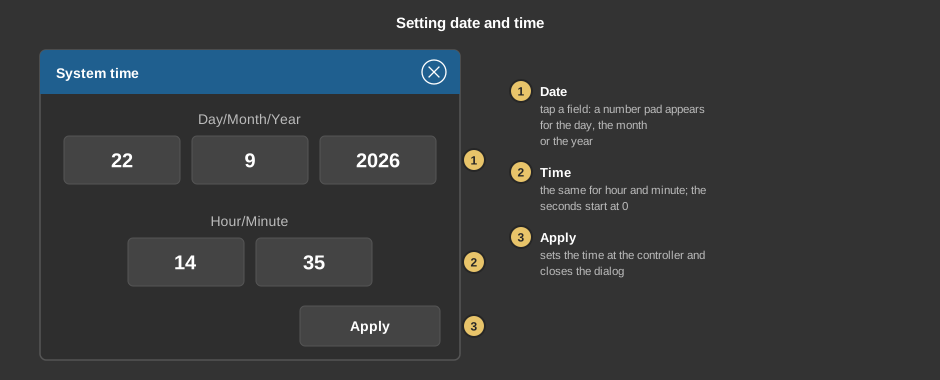
If the dialog is closed without Apply, the time of the controller stays unchanged.
This section is meant for the installer of the system.
No function block is needed, the element talks directly to the controller.
Display |
|
| View | Block or Basic screen. The third choice List (obsolete) comes from older projects and should no longer be used. |
| Text | Caption of the tile. Its size scales with the element, a line break is inserted with \n, two lines at most. Default “Systemzeit” (system time). |
| Seconds | Shows the seconds below the time, in the basic screen as an inner ring. Default off. |
Security |
|
| PIN | Optional, four digits. Asked for in every view before the dialog appears. Empty: no PIN. |
See also General properties of all control elements.