 Block Energy Manager
Block Energy Manager
Block Energy ManagerThis control element shows the energy flow in the house – photovoltaics, grid, battery and consumption – and at the same time operates the energy distribution: the associated function block switches heat pump, wallbox and hot water preparation so that as much of the own solar power as possible is used. The limits for this are set here in the control element.
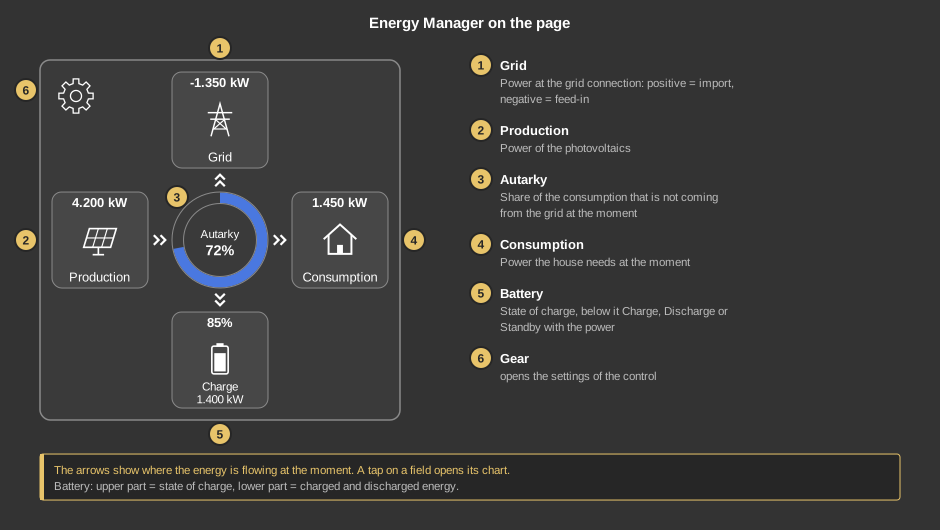
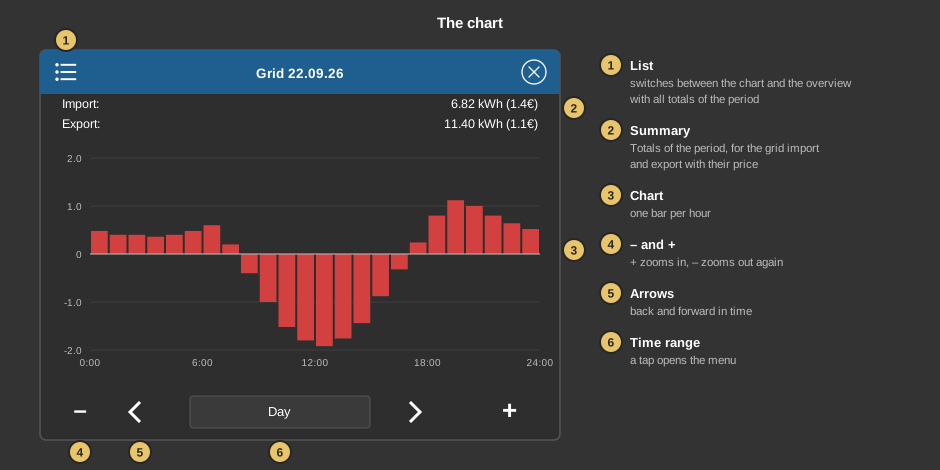
The arrows alternate between single and double every half second, so the energy flow can be seen at a glance. A tap on a field opens its chart – grid, production, consumption or autarky. The battery has two tap areas: the upper part opens the course of the state of charge, the lower part the charged and discharged energy.
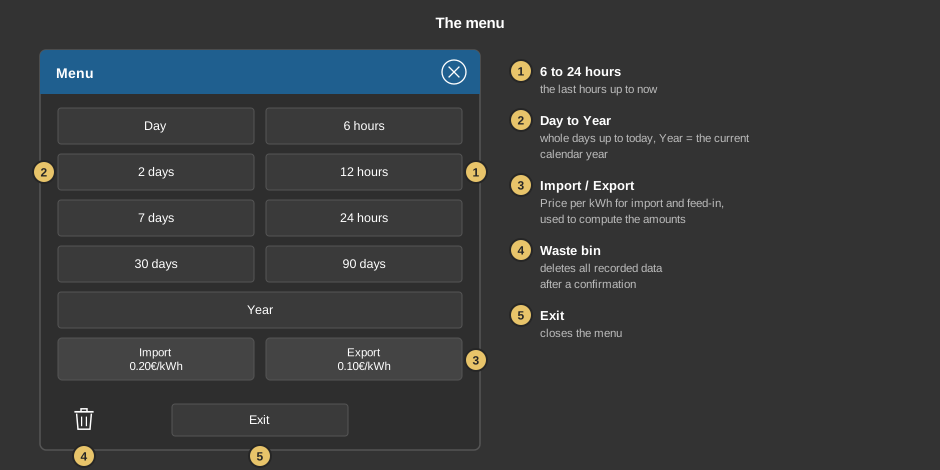
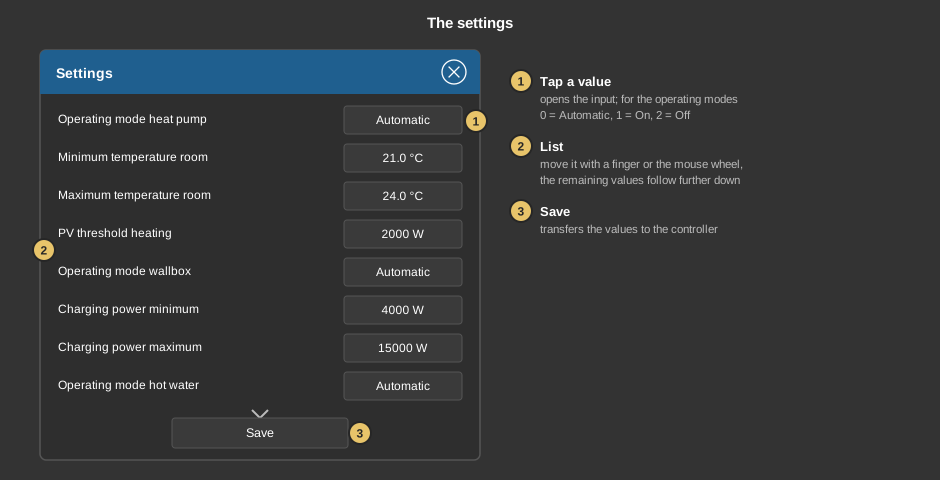
What the individual values do is described in the table Settings below.
This section is meant for the installer of the system.
The control element is linked to the function block Block Energy Manager, which computes consumption and autarky and controls heat pump, wallbox and heater rod: first create the function block and assign variables to its inputs and outputs, then right-click the control element and select the function block. The variables are taken over in the process. Without a link, a tap on the element points this out.
Important: the control element reads the values from the variables at the inputs and outputs of the block. If an input is only wired internally to another block and has no variable, its display stays at 0. Whether the battery is charging or discharging comes from the input Battery status; which values mean charging and discharging is set by the parameters Battery status charge and Battery status discharge of the block. Any other value counts as standby.
The input Operating mode (BA) of the block can override the operating modes of all consumers together, see function block.
The settings are stored in the controller, not in the project. They survive the transfer of a project, but can only be read and written while a connection exists.
Display |
|
| Battery indicator | Shows the battery at the bottom in the middle. The default is on. |
Display consumer |
|
| Text consumer 1 … 5 | Without effect. The Block Energy Manager does not show individual consumers, the block has no inputs for them. The parameters are only kept for existing projects. Individual consumers are shown by the Block Energy Monitor. |
The values of the dialog Settings. The defaults apply until the values are saved for the first time.
Heat pump |
|
| Operating mode heat pump | Off keeps the output Heating enable off. With Automatic the heating is enabled as soon as the PV power reaches the PV threshold heating for five minutes, and immediately when the room is colder than the Minimum temperature room. On always enables the heating, even without PV power. Off also keeps the output Heating hot water off. The default is Automatic. |
| Minimum temperature room | Below it the heating is enabled without delay (cold protection), the setback stays active. Default 21 °C. |
| Maximum temperature room | From this room temperature the setback is always active so that the room is not overheated. In between the setback is lifted as long as more than Grid minimum (reserve) is fed in, and set again on import from the grid. Default 24 °C. |
| PV threshold heating | PV power in W from which the heating is enabled. Default 2000 W. |
Wallbox |
|
| Operating mode wallbox | Off keeps the wallbox blocked. With Automatic it is enabled as soon as at least the Charging power minimum is fed in for five minutes, and blocked when nothing is fed in for one minute. On always enables charging, with the Charging power maximum, regardless of the surplus. The default is Automatic. |
| Charging power minimum | Feed-in power in W from which charging starts, at the same time the starting power and the lower limit of the charging power. Default 4000 W. |
| Charging power maximum | Upper limit of the charging power. In between the power is adjusted so that as little as possible is fed in. Default 15000 W. |
Hot water |
|
| Operating mode hot water | Automatic: the heater rod heats continuously with the PV surplus up to the Target temperature PV as soon as more than Grid minimum (reserve) is fed in for five minutes. On: the heater rod heats with full power up to the Target temperature manual. Off: the heater rod stays off. The default is Automatic. |
| Target temperature PV | Hot water temperature up to which the surplus is used for heating, with a switching difference of 2 K. Default 65 °C. |
| Target temperature manual | Hot water temperature in the operating mode On. Default 45 °C. |
| Minimum temperature hot water | If the hot water drops below it, the heater rod heats with full power in every operating mode until it is 1 K above. 0 switches this protection off. Default 40 °C. |
| Grid minimum (reserve) | Feed-in power in W that is left over with the heater rod – the surplus is regulated to this value. It is at the same time the threshold for the heater rod and for lifting the setback. Default 800 W. |
| PV threshold hot water HP | PV power in W from which the output Heating hot water is set (hot water preparation with the heat pump). Switching on and off are each delayed by 5 minutes. 0 = never. If the operating mode heat pump is Off, the output stays off. Default 3000 W. |
The variables come from the link with the function block and need not be entered by hand. Displayed are:
| Net power kW | Input of the block (grid power), positive = import, negative = feed-in. The arrow appears from 0.1 kW in either direction. |
| PV power kW | Input of the block, the power of the photovoltaics. |
| Battery power kW Battery charge % Battery status |
Optional. Power, state of charge and state of the battery. Not linked: the battery shows 0 % and Standby. |
| Consumption kW | Output of the block, computed from grid, photovoltaics and battery. |
| Autarky % | Output of the block. With at most 0.1 kW import from the grid it is 100 %. |
See also General properties of all control elements.