Block Fault messages
This visualisation element shows at a glance whether a fault is present
anywhere in the installation or has not been acknowledged yet. Tapping opens
the list of all fault messages; faults are acknowledged there, and the log
shows when which fault came and went.
Operation
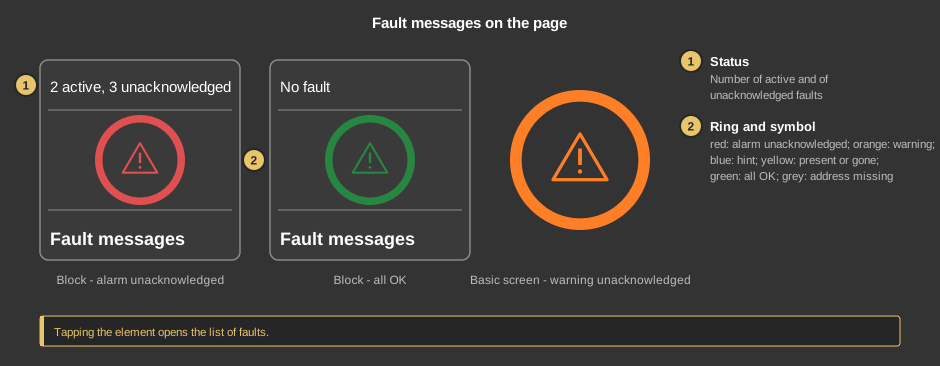
- Status: the number of present and of unacknowledged faults, for
example "2 active, 3 unacknowledged", otherwise No fault.
- Ring and symbol share the same colour:
- red: an alarm has not been acknowledged,
- orange: a warning has not been acknowledged,
- blue: a hint has not been acknowledged,
- yellow: a fault is still present but acknowledged,
- green: everything in order,
- grey: at least one message has no valid address.
As a circle (basic screen) the element shows only ring and symbol. Tapping
the element opens the list.
The list of fault messages
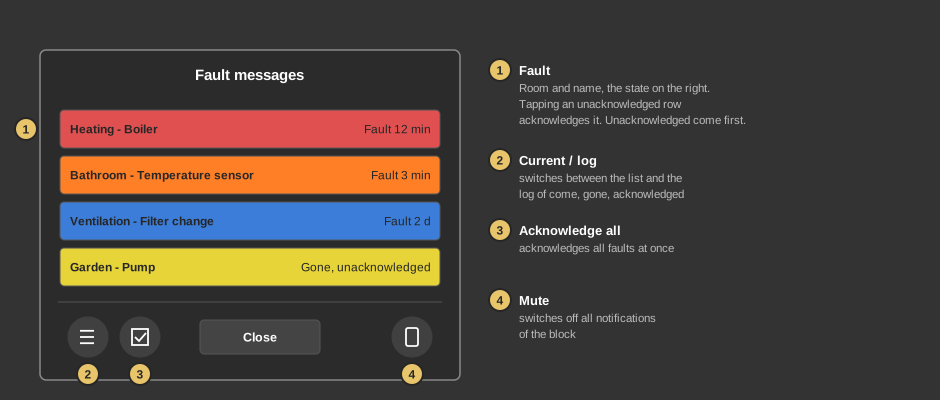
- Fault: room and name per row, on the right the state and, for a
present fault, the time since it came. Unacknowledged faults are at the top.
Tapping an unacknowledged row acknowledges it. If the list is longer
than the window, drag it or use the mouse wheel.
- Current / log: switches between the list and the log. The log shows
the newest entries first: when a fault came and went and when it was
acknowledged.
- Acknowledge all: acknowledges all faults at once.
- Mute: switches all notifications of the block off – push
and mail, whatever the class. The setting belongs to the controller: it applies
to all devices and is kept after a restart. Which class sends a message at all,
and when, is set at the
function block. If a class
is set to "send later", the faults collected while muted go out together when it
is switched on again.
Close closes the list.
An acknowledged fault that is still present stays yellow in the list until it
goes. A fault that has gone but has not been acknowledged stays until it is
acknowledged – so even a short fault is not lost.
Setup
This section is intended for the installer.
The evaluation runs in the
function block Block Fault
messages; the visualisation element only displays it and acknowledges
through its input QI. First create the function block including its variables,
then right-click the visualisation element and select the function block. In the
same menu, Apply comment takes over the name of the block as text.
- Which addresses are monitored, with room, name, class and delay, is set in
the fault message list of the function block. It also holds which class reports
by push or mail and through which input that is released.
- List and log come directly from the controller and do not use
variables.
- Name and room are shown in the selected language. For this they appear in
the language table of the project (Project → Language) as soon as the
visualisation element is linked to the block.
Parameters
| View |
Block, Basic screen or List –
as a list entry the text is on the left and the ring on the right. |
| Text |
Label of the tile and heading of the list, default
Störmeldungen. The size scales with the element, a line break is
inserted with \n, at most two lines. |
Variable links
The variables Status, Number active, Number
unacknowledged and Acknowledge row belong to the
function block and are
taken over when linking. Without the variable Acknowledge row the
visualisation element cannot acknowledge.
See also General properties of all
visualisation elements.