Block Irrigation
This control element operates the garden irrigation: it shows whether
watering is going on and when the next start is due, and here the programs
are set up – which zones run for how long, on which days and in which season.
With rain, frost or wind the irrigation pauses by itself. Everything can also
be set in the app, without the studio.
Operation
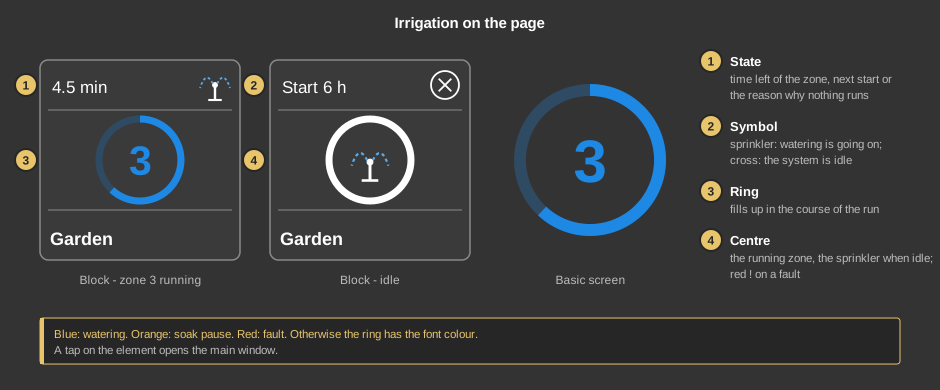
- State: while watering, the time left of the running zone,
otherwise the reason why nothing runs at the moment – for instance
rain, rain pause (a running rain delay), frost,
wind, soak, held or locked. On a fault the
cause is shown here in short (no feedback, flow +, flow
-, leak). If nothing is pending, the line shows when the next
start comes (Start 20 min, Start 6 h). No time means:
no start time has been created at all, so the system never starts by
itself.
- Symbol: the sprinkler while watering, otherwise a cross.
- Ring: while the system runs it fills up in blue in the course of
the run. Orange means a soak pause, red a fault; when the system is idle it
has the font colour.
- Centre: the number of the running zone, the sprinkler when idle. A
red ! indicates a fault.
As a circle (basic screen) the element only shows the ring with its centre.
A tap on the element opens the main window.
The main window
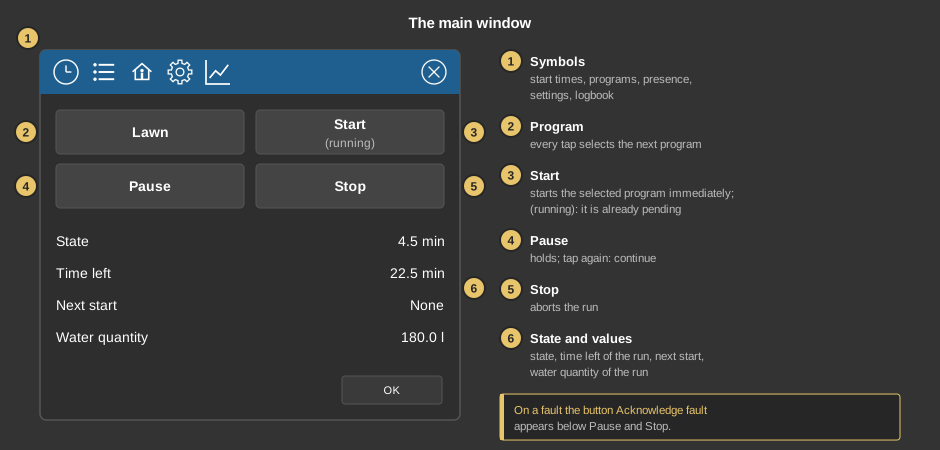
- Symbols of the title bar: from the left the start times (clock),
the programs (list), the presence (house), the settings (gear) and the
logbook (chart) – see below.
- Program: every tap selects the next program; its name is
shown.
- Start: starts the selected program immediately. If it is already
pending, (running) is shown below.
- Pause: holds the irrigation, the button is then lit; another tap
lets it continue.
- Stop: aborts the run, including the programs still waiting.
- State and values: the state as on the tile, the time left of the
whole run, the next start and the water quantity of the run. The next start
reads No start time if no start time exists, and None if none
is due.
If a fault is pending, the button Acknowledge fault appears across
the full width below Pause and Stop, and the State line names the reason in
red – for example “No feedback: Lawn south” if a valve did not answer. At the
function block, the change from 0 to not equal to 0 at input QU does the
same. OK closes the window.
The programs
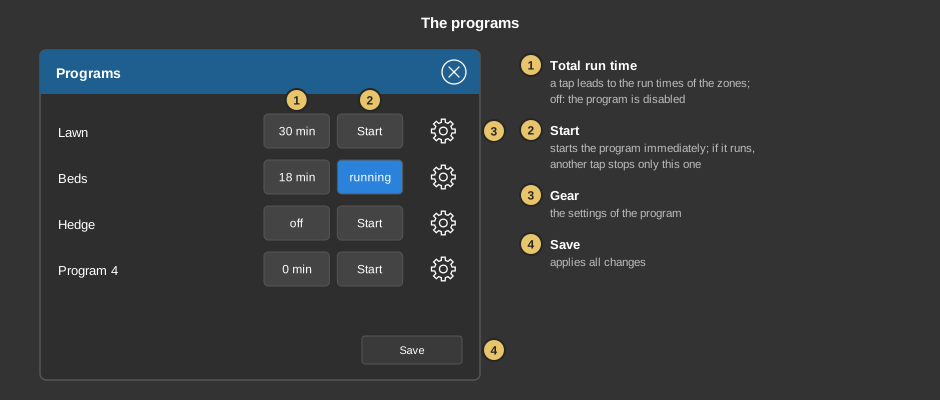
The list behind the list symbol shows all programs with their names.
- Total run time: the sum of the run times of all zones. A tap leads
directly to the run times of the zones. off means: the
program is not enabled.
- Start: starts the program immediately, with the state currently
shown in the list. While it runs, it reads running; another tap stops
only this program, others continue.
- Gear: opens the settings of the program.
- Save: applies all changes to programs and zones. In the sub-views
Save goes back one level; the cross in the title bar closes without
saving.
Settings of a program
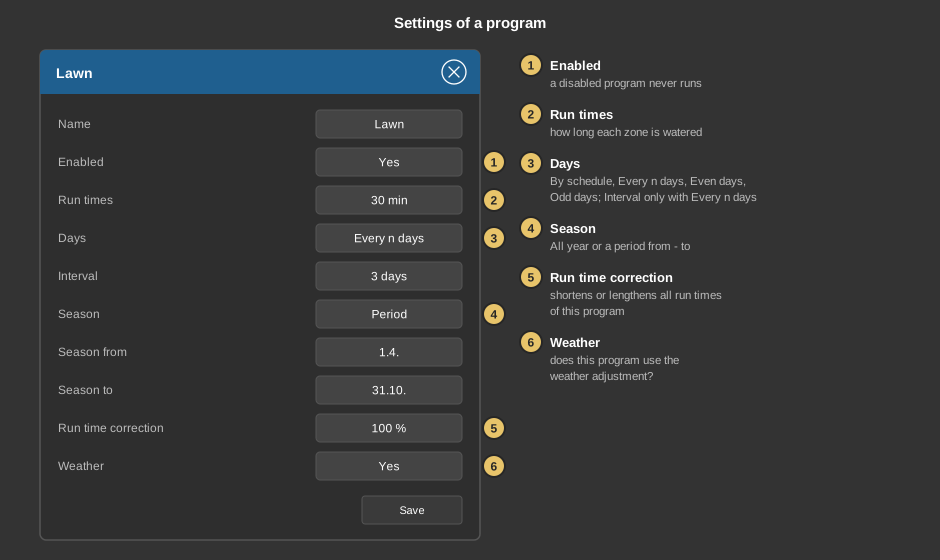
The title bar shows the name of the program. The list can be scrolled; lines
that currently have no effect are hidden. Name renames the
program.
- Enabled: a program set to No never runs.
- Run times: leads to the list of zones, see below.
- Days: a filter, not a start condition – watering only ever takes
place at a start time. By schedule only applies the weekdays of the
start time, Every n days waters only every n-th day, Even
days and Odd days follow the calendar day. Interval (2 to
30 days) only appears with Every n days; the rhythm begins on the day it is
set.
- Season: All year or a period. When switching to a
period, the usual garden year from 1.4. to 31.10. is preset; start and end
are set below at Season from and Season to with day and
month.
- Run time correction: shortens or lengthens all run times of this
program, 0 to 200 %.
- Weather: whether this program follows the weather
adjustment.
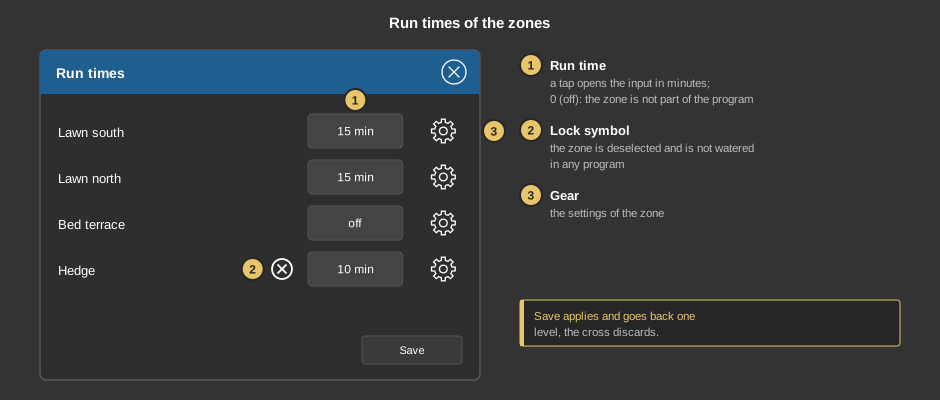
Run times of the zones
- Run time: how many minutes the zone is watered in this program; a
tap opens the input. off (0) means that the zone is not part of this
program.
- Lock symbol: the zone is deselected and is not watered in any
program, but its run times are kept.
- Gear: opens the settings of the zone.
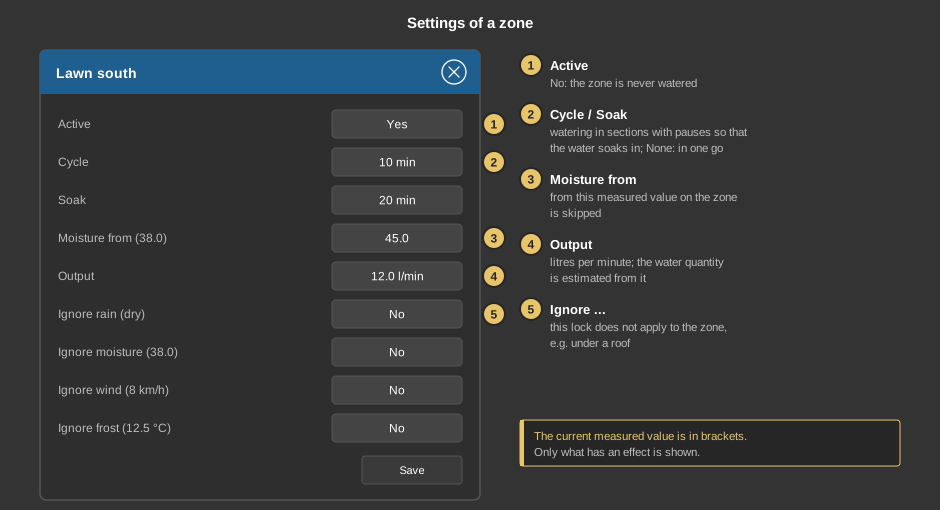
Settings of a zone
The settings of a zone apply to all programs. If a line depends on a
measured value, the value is shown in brackets after the label. Only what has
an effect on this system is shown – without a rain sensor, for example,
there is no “Ignore rain”.
- Active: set to No, the zone is never watered, for instance
with a defective valve or a dug-up bed.
- Cycle and Soak: to prevent water from running off, the run
time is split into sections of Cycle minutes with Soak
minutes of pause in between. None lets the zone run in one go.
- Moisture from: if the soil moisture is above this value, the zone
is skipped. Only present if a moisture sensor is entered for the zone.
- Output: how many litres the zone delivers per minute; the water
quantity shown is estimated from it. With a water meter the quantity is
measured and the line is left out.
- Ignore rain, Ignore moisture, Ignore wind, Ignore frost: the
respective lock does not apply to this zone – for potted plants, covered
areas or the greenhouse.
Settings of the system
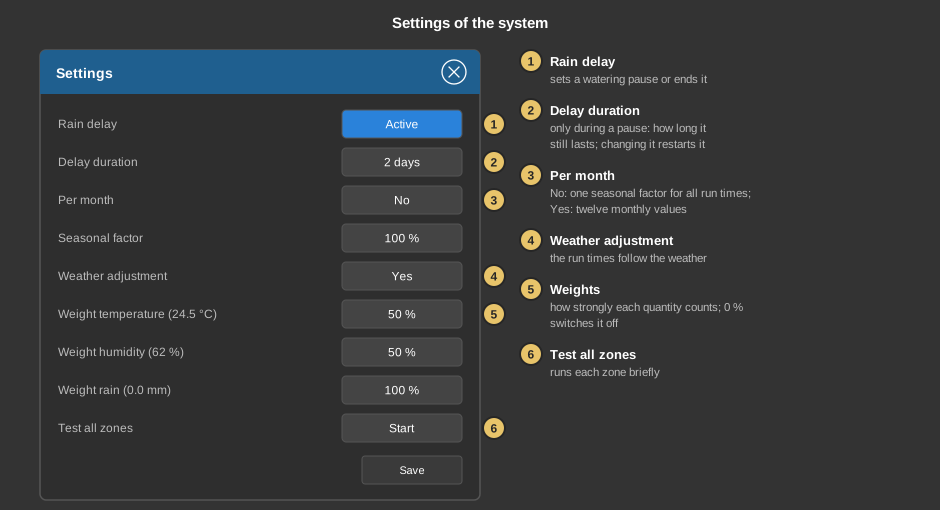
- Rain delay: sets a watering pause by hand, for instance after heavy
rain, or ends a running one. Active means: no watering at the
moment.
- Delay duration: only visible while the pause runs. It says how
many days (1 to 14) it lasts; if the value is changed, the pause runs anew
from now on.
- Per month: with No one seasonal factor applies to
all run times (0 to 200 %), with Yes twelve monthly
values apply; via Edit a percentage of its own is entered for
each month, for example little in April and a lot in July.
- Weather adjustment: the run times follow the weather of the last
24 hours – after heat, watering is longer, after rain shorter.
- Weight temperature, humidity, rain: how strongly the respective
quantity counts in the calculation; 0 % switches it off. The lines
only appear with the weather adjustment switched on and only for values
that are measured.
- Test all zones: runs all zones briefly one after the other. This
way you quickly see whether every valve switches, without waiting for the
full watering time.
Everything except Test all zones is only applied with Save.
Start times, presence and logbook
Behind the clock are the start times. Each start time starts a
program whose name is shown with it; a new start time is set to the first
program. If it reads No program, it triggers nothing. How to operate
the schedules is described under
Presence.
Behind the house it is set what happens when the presence changes: a
tap on the symbol of a state switches the setting on or off, next to it the
program is chosen that then starts – or Only stop, to end a running
run. Without a setting the change does nothing; that is the default.
Behind the chart is the logbook with the latest 32 events:
started and ended programs, zones on and off, skipped zones including the
reason, flow messages and missing feedback from the valves. The bin next to
OK clears the list without confirmation.
Setup
This section is meant for the installer of the system.
The control element is linked with the
function block Block
Irrigation: first create the function block together with its zone
table and addresses, then right-click the control element and choose the
function block. All addresses, the names of the zones and the number of
programs are taken over, the text of the tile gets the name of the block.
Without a link, a tap on the element points this out.
- The zones, their valves, feedbacks and moisture sensors are entered in
the zone table of the function block; cycle, soak, moisture threshold and
the locks per zone are set by the user here in the control element.
- Which lines the user sees depends on what is linked at the block: rain,
wind, outdoor temperature, humidity, rain amount, water meter. If a weather
factor is applied to the block from outside, the own weather adjustment is
left out.
- How long each zone runs with Test all zones is determined by the
minimum run time at the function block.
Parameters
| View |
Block or Basic screen. The choice
List comes from older projects; it only appears if it is already
set. |
| Text |
Caption of the tile, default “Irrigation”. When linking,
the name of the function block is taken over. A line break is inserted
with \n. |
Address links
All addresses are located at the
function block and are
taken over when linking.
See also General properties of all control
elements.