 Block Media control
Block Media control
Block Media controlThis control element operates the music in a room, for example a speaker in the living room: start and pause playback, jump to the previous or next track, set the volume and call up up to four favourite stations or playlists with a single tap.
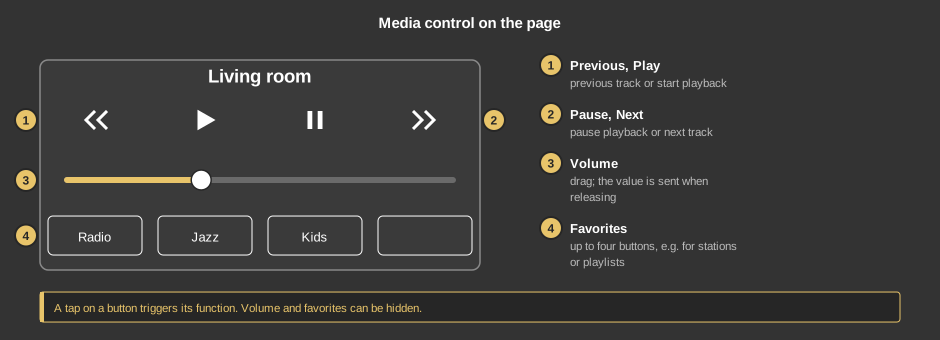
Each button acts when released and triggers its function once; while the finger rests on it, it is highlighted. Volume and favorites may be hidden.
This section is meant for the installer of the system.
The control element combines several variables into a media control; no function block of its own is needed. The variables are linked directly at the control element and connected, for example, with the inputs of the function block Sonos (local). When tapped, the buttons send the sequence 0 – 1 – 0, i.e. a rising edge; at the function block the rising edge is therefore chosen as trigger.
The control element is wider than it is high; buttons, slider and favorites share the height, hidden parts leave their space to the others.
Display |
|
| Text | Heading of the element, default “Media”. Its size scales with the element. |
| Volume | Shows the volume slider. Default on. |
| Volume increment | The slider moves in these steps (1 to 100), default 1. Only visible when Volume is switched on. |
| Favorites | Shows the four favorite buttons. Default on. |
| Favorite 1 to Favorite 4 | Caption of the respective favorite button. Without text the button stays empty but is still drawn. |
| Play, Pause | Optional. A tap on the button sends 0 – 1 – 0. Not linked: the button does nothing. |
| Previous, Next | Optional. Like Play, for the previous or next track. Not linked: the button does nothing. |
| Favorite 1 to Favorite 4 | Optional. Like Play, one per favorite button. Which station or list is called up is defined by the connected function block. Not linked: the button does nothing. |
| Volume % | Optional. Volume 0 to 100 %. The slider writes the set value when released and shows the value arriving on the variable. Not linked: the slider does nothing – then better switch off the parameter Volume. |
See also General properties of all control elements.