 Block Storage optimizer
Block Storage optimizer
Block Storage optimizerThis control element belongs to a battery storage that is charged and discharged according to the electricity price and the solar forecast. It shows how the energy in the house is flowing at the moment, what electricity costs and earns right now, and the schedule for the next up to 48 hours: when the storage is to charge and when to discharge. The charts show generation, consumption, grid import, costs and revenues of the past.
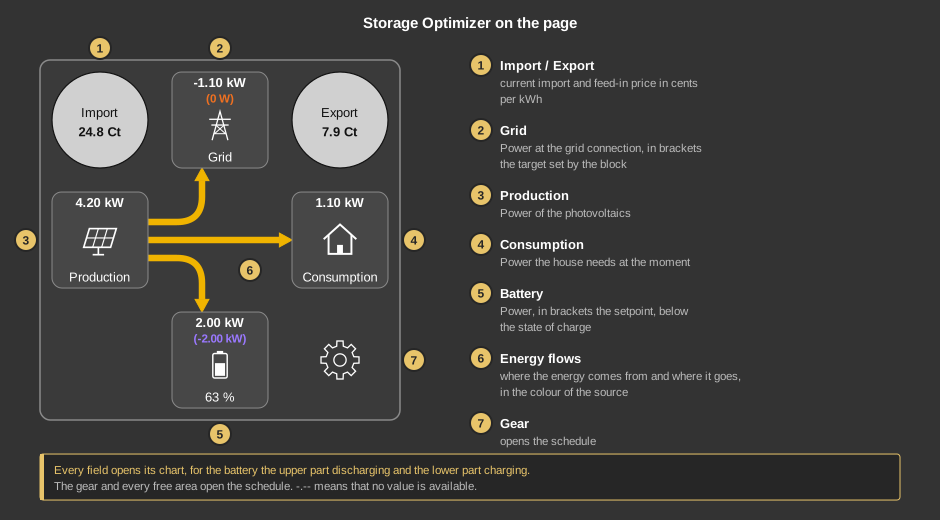
A tap on a field opens its chart. The battery tile has two tap areas: above the symbol discharging, below it charging. The two price circles open the costs and revenues in euros. The gear and every free area open the schedule; from there the computed data and the settings can be reached.
If -.-- is shown instead of a number, no value is available. For the setpoint this also means that there is no schedule and the block sets nothing.
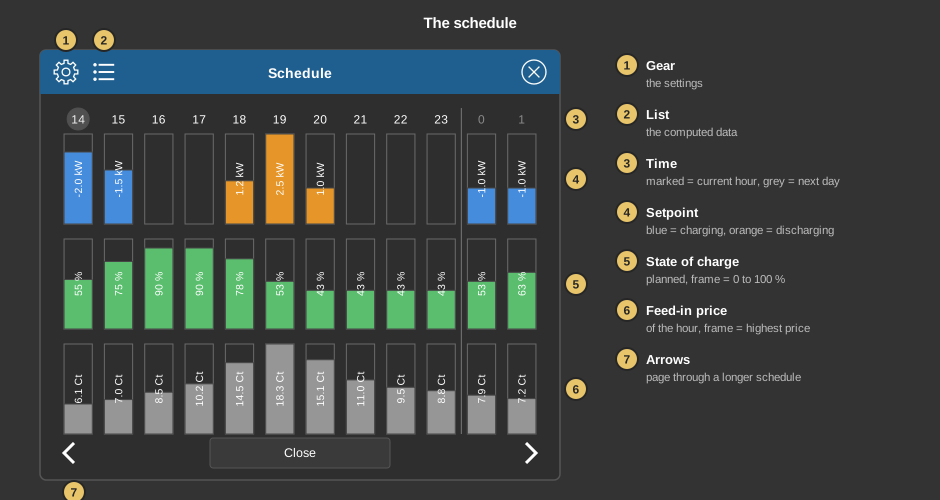
What is shown is the feed-in price and not the import price: it is the revenue a discharge into the grid earns in that hour, and therefore the value against which the planned setpoint can be read. The import price is shown by the circle Import and in the computed data.
The schedule always starts at the current hour; past hours are not shown. It reaches as far as prices are available, at most 48 hours. The hours of the following day only appear once its prices are known – until then the schedule ends at midnight. Side by side one page shows 24 hours in landscape and 12 in portrait. The schedule is updated on every recalculation and every change of hour, also while the dialog is open. Without a connection to the controller “No schedule available” appears.
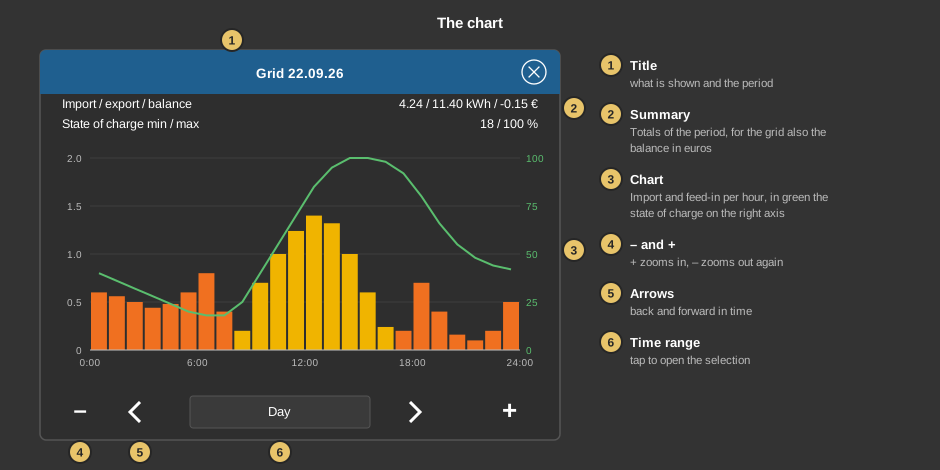
What each field shows:
The amounts in euros are computed continuously with the price valid at that moment – they are therefore correct even with a tariff whose price changes every hour. Without a connection to the controller the charts stay empty.
The List in the schedule opens the computed data: a pure display of whether a valid schedule exists, what is planned next, which prices apply at the moment and in which state the storage is. The list can be moved with a finger or the mouse wheel.
The gear in the schedule opens the Settings. A tap on a value switches On/Off, steps a selection on or opens the input of a number. For everyday use the Operating mode as well as Block grid charging and Block feed-in matter most; the other values are set up by the installer. Only Save transfers the changes, without saving everything stays as it was. What the individual values mean is described below under Settings dialog.
This section is meant for the installer of the system.
The control element is linked to the function block Storage optimizer block (right-click the control element). The variables are taken over in the process. The control element has no parameters of its own: apart from the grid connection limit and the plant type, which are set at the block, all settings of the block are made here in the dialog Settings. Without a link, a tap in the Studio points this out, and the tiles show -.--.
Important: the measurement inputs of the block need variables. The tiles read their values from the inputs grid power, PV power, consumption, battery power and state of charge. If these inputs are only wired internally to another block, there is no address and the tile shows “-.--”. The block itself computes completely even without these addresses – the requirement only concerns the display. If the input consumption has no address, the consumption tile uses the output Consumption measured, which the block computes anyway.
About the recording. The function block stores one value per hour, kept for two years, in a separate file per block in the controller. Only what is measured is recorded: if an input is not connected at all – neither to an address nor to another block – the channel is not created and the chart reports “No data available”. An internal wire is enough for the recording. For costs and revenues the grid power input is enough, the block knows the prices itself.
The parameter plant type (Anlagenart) of the block decides what is controlled: with battery command the block sets the power of the storage and regulates itself, with grid command it only sets the setpoint at the grid connection point and the system regulates itself. The Setpoint manual and the group Controller depend on it.
The dialog is display only. It reads the outputs of the block and is therefore complete even when the measurement inputs have no addresses. Only “Schedule age” comes from the schedule itself.
Schedule |
|
| Schedule valid | Yes as long as a computed schedule exists. If this shows No, the block works according to the behaviour on data loss. |
| Schedule age | Minutes since the last recalculation. The value must not stay permanently above the configured interval between two recalculations. |
| State of charge setpoint | Planned state of charge at the end of the current hour in percent. |
| Planned charge Planned discharge |
Sum of the planned charging or discharging energy over the next 24 hours in kWh. |
| Expected yield | Expected profit of the schedule over the next 24 hours in euros, after deducting all losses. With a flat price this shows 0, because shifting energy does not pay off. |
| Next charge in Next discharge in |
Minutes until the next planned charging or discharging window. If the window is already running it reads active – the normal case in self-consumption. If no window is planned any more it reads none. On an address the output delivers the minutes as a number: 0 for a running window, -1 when none is planned. |
Prices |
|
| Current import price | Import price of the current interval in cents per kWh. |
| Current feed-in price | Feed-in price of the current interval. If the price source knows no feed-in price, the configured fixed feed-in tariff is shown here. |
State |
|
| Operation | The operating state in plain text: Standby, Charge from PV, Charge from grid, Discharge self-consumption, Discharge into the grid, Manual, Emergency operation, Off or Charge feed-in limit. |
| Charge active Discharge active |
Yes as long as the storage is being charged or discharged. |
| Grid charging active | Yes if the charging energy comes from the grid. |
| Feed-in active | Yes if the storage delivers into the grid. |
| Grid charging blocked | Yes if grid charging would be profitable but is prevented by the lock or by the minimum gain. This tells apart a setting that holds things back from there simply being nothing to earn. In the operating modes Manual and Off it always reads No. |
| Error | Yes if there is no valid price series or the battery capacity is 0. Missing or outdated measured values do not set this output; the behaviour on data loss applies there. |
Recording |
|
| Consumption measured | The consumption currently in use – from the input consumption or computed from grid, generation and battery. |
| Consumption learned | The learned value applied for the current hour. If the cell of this weekday is still empty, the average of the same hour across the weekdays already learned is shown. 0 means nothing has been learned for this hour yet and the base load applies. |
| Coverage | Share of the already filled cells of the consumption profile in percent. The profile has one cell for every hour of every weekday; after a full week of operation this shows 100 %. Until then the block uses the base load for empty hours. |
Operation |
|
| Operating mode | Automatic (default): the storage follows the computed schedule. Manual: the manual setpoint applies. Off: the setpoint is 0, the storage stands still. Self-consumption: the schedule is still computed and shown, but not executed – surplus is charged, import is covered from the storage, grid charging and feed-in do not take place. In Manual and Off the two locks have no effect; the protective limits – state of charge and grid connection limit – apply in every operating mode. |
| Setpoint manual | Only acts in the operating mode Manual and follows the plant type: with battery command the power of the storage (negative = charge, positive = discharge), limited to the configured charging and discharging power; with grid command the setpoint at the grid connection point (positive = import, negative = feed-in). There it is passed on unchanged – without conversion, dead band and ramp, limited only to the grid connection limit. |
| Block grid charging | On prevents a charge from the grid foreseen in the schedule from being executed – the setpoint is 0 in those hours. The schedule is still computed unchanged; the output Grid charging blocked reports the case. Default Off. |
| Block feed-in | On prevents a delivery into the grid foreseen in the schedule from being executed. Discharging for self-consumption stays allowed. This lock too only acts on the execution, not on the computation. Default Off. |
Storage |
|
| Battery capacity | Usable capacity in Wh, default 10000 Wh. It is the reference for all percentages in this dialog. With 0 no schedule is computed and the output Error goes to Yes. |
| Maximum charging power Maximum discharge power |
Highest power for charging or discharging, default 2500 W each. It limits the energy the schedule may assign to an hour and the setpoint handed out. |
| Charging efficiency Discharging efficiency |
Together the round-trip efficiency, default 95 % each. It is part of the cost of every planned shift: what is stored has to come out again more expensive by the losses. An efficiency set too high makes deals look profitable that are not – especially with grid charging. Permitted are 10 to 100 %, a value outside is set to 95 %. |
| State of charge minimum State of charge maximum |
Working range of the storage in percent, default 10 to 100 %. Below the minimum it is no longer discharged, above the maximum no longer charged – in the planning as in the execution. If the maximum is not greater than the minimum, 10 % and 100 % apply. |
| Emergency power reserve | Raises the minimum state of charge over the whole planning period; the higher of the two limits wins. Default 0 %. |
| Reserve at the end of the planning horizon | Lower limit for the last six hours of the planning horizon, and there only while the prices of the following day are still missing. It prevents the schedule from emptying the storage in the evening because it sees no expensive hour beyond the horizon. Default 20 %. |
| Feed-in only from | A separate, higher lower limit for delivery into the grid only, default 30 %. Below it the stored energy stays reserved for self-consumption – energy sold would otherwise have to be bought back later at the higher import price. |
Economic efficiency |
|
| Price source | Automatic (default) takes the price series from the price blocks present in the project: a source with its own feed-in price beats any pure exchange source, with equal suitability the most recently updated one wins. eFriends, aWATTar and ENTSO address exactly that source; if the corresponding block is missing, no price series is available. Fixed prices builds a flat series from the fixed import price and the feed-in tariff – without price differences no charging or discharging plan is created, the storage runs self-consumption. No error is reported in this case. |
| Maximum grid charging power | Highest power for charging from the grid, the charging power of the storage applies in addition. Default 2000 W. The value 0 switches grid charging off completely in the planning – unlike the lock, which leaves the schedule untouched. |
| Minimum gain PV | Threshold in ct/kWh for every shift whose energy comes from the generation or from the energy already stored, default 3. Only if the margin between revenue and cost – losses included – is at least this large is the hour scheduled. The value covers ageing and wear; the higher it is, the less often energy is shifted. |
| Minimum gain grid charging | The same threshold for energy from the grid, default 8 ct/kWh. It is usually higher because the price risk comes on top. If a profitable grid charge stays below it, the output Grid charging blocked reports it. |
| Fixed import price | Energy price in ct/kWh, default 25. It is used only with the price source Fixed prices. |
| Feed-in tariff | Revenue in ct/kWh for energy into the grid, default 5. It applies whenever the price source knows no feed-in price of its own – with the pure exchange sources. At the same time it is the price forgone when charging from the generation, i.e. the cost of a PV shift. |
Forecast and recording |
|
| Base load | Assumed consumption in W for every hour for which nothing has been learned yet, and when the recording of the consumption is off. Default 350 W. A value set too low lets the schedule sell more energy than the house has to spare later. |
| Record consumption | Learns the consumption into a profile with one cell per hour and weekday, default On. For an hour still empty on that weekday the average of the same hour on the other weekdays applies, only without any value the base load. Without the inputs consumption or generation nothing is recorded on purpose. |
| Record PV yield | Learns the daily course of the generation into a profile with one cell per hour, default On. The daily total of the forecast is distributed along it instead of along a fixed bell curve between 6 and 20 o'clock. If no forecast value is linked, the profile itself serves as the expectation. |
| Learning rate | Weight with which the average of the elapsed hour enters the profile cell, 1 to 50 %, default 25 %. Small means sluggish and calm, large fast adaptation with more deflection after an unusual day. An empty cell is filled immediately with the first value, an outlier is limited to four times the previous value. |
| Planning horizon | How far the schedule reaches, 2 to 48 hours, default 36. Planning only goes as far as the price source delivers prices. The horizon also determines where the reserve at the end of the planning horizon applies: in its last six hours. |
| Maximum age of the prices | How long ago the last successful request to the price source may lie – not the period the prices cover. If it lies further back, the optimizer discards the series: no schedule, Schedule valid No, Error Yes, and the storage runs according to the behaviour on data loss. If a request fails, the price block keeps its last prices, only the time stamp does not move on. The price blocks query once an hour; the default of 120 minutes therefore bridges two unsuccessful attempts. With Fixed prices the setting has no effect. After a restart a price series restored from the database counts as ageless until the source has been queried successfully once. Adjustable from 5 to 1440 minutes. |
| Recalculation every | Largest interval between two computations of the schedule, 1 to 120 minutes, default 15. In between it is also computed as soon as an hour has elapsed, the state of charge deviates from the planned one by more than 5 % of the capacity or the PV forecast changes by more than 10 % – at the earliest 60 seconds after the last computation. |
Controller |
|
| The first four values only act with the plant type battery command. With grid command the system regulates itself. The behaviour on data loss applies to both plant types. | |
| Control cycle | Interval in seconds at which a new setpoint is formed, 1 to 300 s, default 5 s. The grid power is averaged over the elapsed cycle. A very short cycle makes a sluggish system regulate against its measurement that has not settled yet. |
| Dead band | Changes below this value in W are not handed out, default 100 W. That keeps the number of commands small – some storage systems block their interface when written to too often. Changes forced by a limit and operator entries are not affected. |
| Control gain | Share of the control deviation compensated per cycle, default 50 %. At 100 % the error is corrected in one step, below that over several cycles. Permitted 1 to 100 %, a value outside is set to 50 %. |
| Ramp | Largest change of the setpoint in W per second, independent of the control cycle, default 2000 W/s. If a hard limit – grid connection or state of charge – demands the change, it takes effect immediately. |
| Behaviour on data loss | Applies as soon as no valid schedule exists, for instance because the prices are missing or too old. Standby: the setpoint is 0. Self-consumption (default): surplus is charged, import is covered from the storage – the storage stays usable even without prices. |
Diagnosis |
|
| Diagnostic messages | Switches on the messages of the block in the log. Intended for commissioning only, default Off. |
The state of charge therefore has four lower limits side by side, the highest one wins: State of charge minimum always and for everything, the Emergency power reserve over the whole planning period, the Reserve at the end of the planning horizon only in its last six hours and Feed-in only from for delivery into the grid alone.
Changes are made on a working copy: only Save transfers the values to the controller. The settings are stored in the controller, not in the project; they survive the transfer of a project, but can only be read and written while a connection exists. If several control elements are open at the same time, a change appears there immediately.
See also General properties of all control elements.