 Script programming
Script programming
Script programmingWith this function block you can program your own scripts in a high-level language. Lua (www.lua.org) is used as the interpreter. This description only covers the language extensions.
Inputs |
||
| E1-x |
Input
1-x |
Inputs. These can be accessed in the script via
the global variables E1, E2, etc. For a better
overview, alias names can also be assigned to them. |
Outputs |
||
| A1-Ax |
Output
1-x |
Outputs. These can be accessed in the script via the global variables A1, A2, etc. For a better overview, alias names can also be assigned to them. |
Parameters |
||
| Number of
inputs |
Number of inputs (1 to 64) |
|
| Number of
outputs |
Number of outputs (1 to 64) | |
| onEvent Filter |
Selection "Active (only connected)" or "Inactive (all telegrams)". The filter only affects the callback function onEvent: With "Active" (default), only telegrams whose address is connected at any input or output of this block are forwarded to the script. With "Inactive", all telegrams are forwarded, additionally also READ requests. The filter has no effect on the functions sys_get_value and sys_set_value; these also work without a connection. Please note that processing all events in large projects takes more processing time, so the filter should only be deactivated when this is necessary. | |
| Password | Optionally, a password can be assigned. The script can then only be edited with a valid password. Please note: There is no way to reset the password. | |
| Edit |
Click this button to edit the
script; alternatively you can also right-click
on the function block. |
|
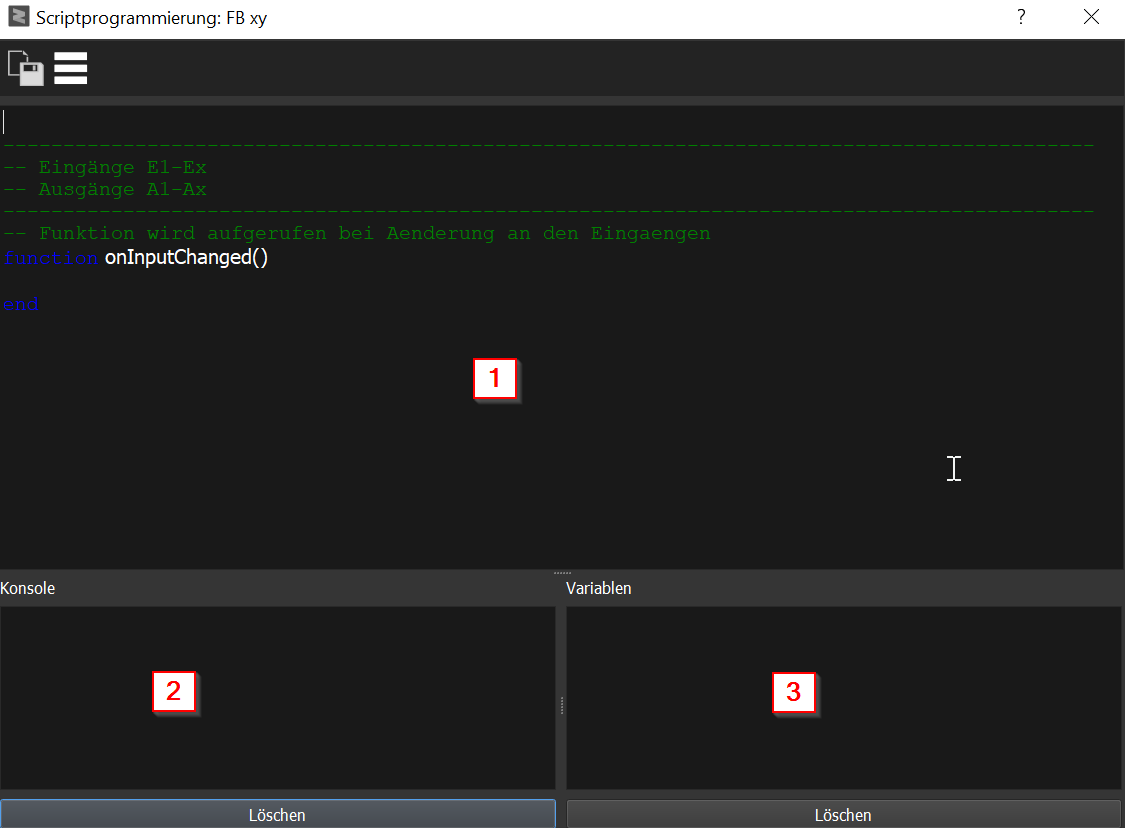

Important:
| onCreate() |
This function is called once
when the function block is initialized. Here,
for example, initializations of global variables
can be defined. |
| onInputChanged() |
This function is called when
the initialization is finished (after onCreate), or the value
at a connected input has changed. Telegrams that send the same
value again do not trigger a call — if the script needs to react
to every telegram, the function onEvent must be used. |
| onEvent(Value,PhysAddress,GroupAddress,Command) |
This function is called when
a telegram has been received, for example a KNX variable
connected at the input. By default (parameter
"onEvent Filter" = Active), only telegrams whose address is
connected at an input or output of this block are forwarded to
the script — at which input/output and in which order the
address is connected does not matter.
With "Inactive (all telegrams)", all telegrams are
forwarded. READ requests are only forwarded when the filter is
inactive. The following arguments are passed to the function:
|
| onTimerEvent100ms() | This function is called every 100 ms |
| onTimerEvent1s() |
This function is called once per second. |
| onTimerEvent10s() |
This function is called every 10 seconds. |
| onTimerEvent30s() |
This function is called every 30 seconds. |
| onTimerEvent1m() |
This function is called once per minute.
The call always occurs at the beginning of every minute. |
| onTimerEvent1h() |
This function is called once per hour. The call always occurs at the beginning of every hour. |
| onGlobalChanged(Id,Value) | This function is called when a global variable has been changed via sys_set_global_value. |
| onOsExecuteFinished(Id,Result) | This function is called when the command called via sys_os_execute has been executed. Id is the Id that was passed by sys_os_execute, Result is the result, 0=No error, otherwise an error code depending on the command that was called. |
| onNetRead(DataString,SizeString,DataHex,SizeHex) | This function is called when data has been received via a network connection. The data is passed both as a string and a hexadecimal string. |
| onNetState( State, Message ) | This function is called when the network status changes:
|
| onHttpResponse( Id, Status, Body, Headers ) | This function is called when the response to a sys_http_request is available. Id is the request id returned by sys_http_request, Status is the HTTP status code (e.g. 200) or a negative value on transport/SSL error (-2 = HTTPS without SSL support), Body is the response text and Headers a Lua table of the response headers. |
| onProcess() | Called on every runtime cycle. Important: use only for time-critical calculations — the call occurs very frequently and can load the entire controller with complex logic. |
| onMqtt( Topic, Message ) | Called when an MQTT message is received. Topic = topic as a string, Message = content as a string. This requires a configured MQTT client in the settings of the controller. |
Frequent questions about the interaction of script, connections and telegram filter:
Whether telegrams arrive or are filtered can be checked directly in the editing window (Play button pressed, then save — the script runs immediately on the controller):
function onEvent(Value, PhysAddress, GroupAddress, Command)
  sys_debug_print(Command, " ", GroupAddress, " = ", Value, " from ", PhysAddress)
end
Every telegram that reaches the block is displayed in the console this way. If no messages appear although telegrams are expected, they are being filtered while "onEvent Filter" is active (address not connected) — as a check, temporarily set the filter to "Inactive".
| sys_set_value("0/0/0",Value,Force) |
Writing any variable: The variable is only sent when the value has changed. This means the function can also be called cyclically.
|
| sys_get_value("0/0/0") |
Query the value of a variable
|
| sys_debug_print(...) |
Output of a line in the console.
On every call a new line is output in the debug console;
this can be used, for example, to check
whether a function has been called. The function accepts any number of arguments, all of which are output concatenated as a string. Numbers are automatically converted to strings, strings must be in quotation marks. Examples:
|
| sys_debug_watch("Name: ",Value) |
Output the value of a variable. Two arguments are passed to the function:
|
| sys_diag_message("Message",Type,Level) | Output a message or error in the diagnostics in the Studio. The
message is output directly in the diagnostics area (footer - message/error).
This makes diagnostics easier when additional
operation via the visualization is necessary. All three arguments are mandatory. Order: first Message, then Type, then Level — if the order is swapped, the message is silently ignored.
|
| sys_alias("E1","Value_xy") |
With this function, a symbolic name can be assigned to an input
or output. These are
then also displayed in the window for the connections. Important: Aliases should be defined in the function "onCreate()" (technically the call is also permitted in other callbacks, but the alias only takes effect from the next callback entry). The alias names must not contain spaces, umlauts or special characters. If an alias name has been assigned to an output, the alias takes precedence over A1, etc.: an assignment to A1 is NOT transferred to the output after the callback; instead the value of the alias variable is used.
|
| sys_get_addr_in(1) |
Returns the address of the connected
variable of an input in the format "1/2/3"; here 1 is E1,
etc. |
| sys_get_addr_out(1) | Returns the address of the connected variable of an output in the format "1/2/3"; here 1 is A1, etc. |
| sys_set_persistent_value("Id","Value") |
With this function, any
data can be stored in the persistent area of the controller.
Unlike the function sys_set_value, this function can store
any values regardless of the data type of a variable. Important: The controller is equipped with a flash memory that must not be written any number of times. This function must therefore not be called too often. Constantly saving persistent values shortens the lifetime of the flash memory and leads to a defect or data loss. |
| sys_get_persistent_value("Id","DefaultValue") | With this function, the
persistent values can be read back. |
| sys_set_global_value("Id","Value",force) | Set a global variable. With
this function, global variables can be used. Via
these, multiple instances of the interpreter can communicate.
For example, multiple script function blocks without having to use
variables. A unique Id and the value are passed as parameters, optionally the parameter force ( 1 or 0 ). When a value is changed, the callback function "onGlobalChanged" is called on all function blocks, except the block that changed the value. If the parameter force is specified with 1, the function "onGlobalChanged" is always called, even if the value has not changed. |
| sys_get_global_value("Id","DefaultValue") | Read the global variable. |
| ms = sys_get_tick_count() |
Returns the time elapsed since the start of the controller
in milliseconds as an integer. Useful for your own
time measurements or for calculating differences. |
| sys_force_update_output(index) |
Forces an output to be sent again to the
connected bus. index = 1-based output number (1 = A1, 2 = A2,
etc.). Useful when the current value should be output
again without a change (e.g. cyclic refresh telegrams). |
| pidId = sys_pid_create() |
Creates a PID controller and returns its ID. |
| output = sys_pid_call(pidId, input, p, i, d) |
Calculates a PID step. input = current
actual value, p/i/d = controller parameters. It is typically called
cyclically (e.g. from onTimerEvent1s) with the current actual value and returns
the manipulated value. |
| id = sys_os_execute("command") | Call an external program. This call is similar to the Lua
command "os.execute", however the command is executed in the background
and does not block the script. After execution,
the callback function onOsExecuteFinished is called. Argument: complete shell command as a string. Return: a consecutive execution ID (integer), NOT the exit code. The exit code comes asynchronously as the second parameter "Result" in onOsExecuteFinished(Id, Result), where Id matches this return value. Important: For slow commands, set a timeout in the command itself (e.g. "curl --max-time 5 ..."), as the background thread would otherwise keep running for a long time. |
| sys_send_mail(To, Subject, Body, Attachment) | Send an email. All four parameters are mandatory
(for "no attachment" pass an empty string "").
|
| sys_send_pushover(User, Title, Message, Priority, Sound, Device, Url, UrlTitle, ApiToken) | Send a push message via Pushover without having to
create a dedicated function block. The first three parameters are
mandatory, all others may be omitted.
Important: The number of messages per hour and day is limited. This limit is shared with all Pushover function blocks of the project. Example: sys_send_pushover("uQiRzpo4DXghDmr9QzzfQu27cmVRsG","Alarm","Cistern empty",1,"siren") |
| sys_send_ntfy(Server, Topic, Title, Message, Priority, Tags, Click, Attach, Token) | Send a push message via ntfy without having to create
a dedicated function block. The first four parameters are mandatory,
all others may be omitted.
Important: Without an access token anyone who knows the topic can read the messages. For anything other than test messages use a topic that is hard to guess or your own server with a token. The number of messages per hour and day is limited; this limit is shared with all NTFY function blocks of the project. Example: sys_send_ntfy("","house-alarm-3f7a2b","Alarm","Cistern empty",4,"warning,droplet") |
| Note on the timer mechanism:
The sys_timer_* functions are passive
poll timers — there is NO callback on expiry. The status
must be queried in a regular onTimerEvent* callback itself with
sys_timer_finished(id). For fixed intervals
(100ms, 1s, 10s, 30s, 1m, 1h) the onTimerEvent* callbacks without
sys_timer_create are simpler. |
|
| id = sys_timer_create() | Creates a timer. Before timers can be used, they must
first be initialized. This function returns an ID,
which is used as a parameter for all further functions. |
| sys_timer_start(id,timeMs) | Starts the countdown of the timer (runtime in milliseconds). Triggers NO callback — the expiry must be actively queried via sys_timer_finished. |
| sys_timer_stop(id) | Stops the timer. |
| sys_timer_elapsed(id) | Returns the time since the start of the timer in milliseconds. |
| sys_timer_finished(id) | Returns 1 when the time specified with "sys_timer_start"
has elapsed, otherwise 0. This function is the only way to
find out that the timer has expired — typically queried in
onTimerEvent100ms(). Example: local t = -1
function onCreate()
t = sys_timer_create()
sys_timer_start(t, 500)
end
function onTimerEvent100ms()
if sys_timer_finished(t) == 1 then
A1 = 1 - A1
sys_timer_start(t, 500) -- restart
end
end
|
| sys_comm_open("/dev/ttyONBOARD-232","115200","8","1","N") | With this function, the serial interface is initialized.
|
| sys_comm_close() | The port is closed. |
| len,dataString = sys_comm_read(len,timeout,"_ASCII") | Reads data from the interface
|
| sys_comm_write(len,data,"_ASCII") | Sends data to the interface
|
| Id = sys_net_create("_TCP",IPAddress,IPPort,Timeout) | Initializes the network connection. This function is not
blocking. The connection is established in the background; the
status is returned in the callback function "onNetState".
See callback functions "onNetState( State, Message )",
"onNetRead( DataString, SizeString, DataHex, SizeHex )" |
| sys_net_write(Data,"_STRING") | Sends data to the connected network device
Return
|
| sys_net_close(Id) | Closes the connection. |
| Id = sys_http_request(Method,Url,Body,ContentType,Headers) | Sends an HTTP or HTTPS request. This function is
not blocking: the request is
processed in the background, the response is returned in the callback
function "onHttpResponse".
The response arrives asynchronously via the callback function
"onHttpResponse( Id, Status, Body, Headers )". Comparing the return
value directly with the HTTP status is wrong – the function returns
the request id, not the status. Example:
function onCreate() |