 Location and tariffs
Menu Project – Location and tariffs.
Here you enter the location of the installation (longitude, latitude, height above sea level), time zone, country, currency and the tariffs per medium.
The location is needed to calculate sunrise, sunset and the highest position of the sun – for instance for switching times of the type Sun position or for the shading.
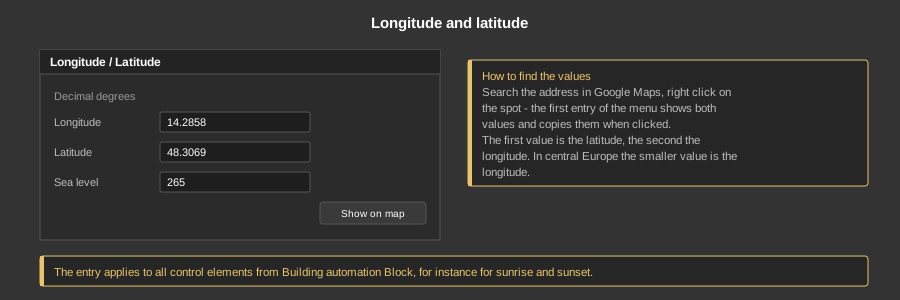
Both values are entered in decimal degrees, so 14.2858 instead of 14° 17' 9”. A comma is converted into a point automatically when saving. The field Sea level holds the altitude of the location in metres; it belongs to the location data of the project.
The button Show on map opens the entered position in Google Maps – so it can be checked right away.
Tip: To find the values, search the address in Google Maps and right click on the spot. The first entry of the menu shows both values and copies them into the clipboard when clicked. Then press Paste from clipboard in the dialog: latitude and longitude go into the right fields by themselves. Google Maps copies the latitude first, while the dialog shows the longitude at the top. A copied Google Maps link and values in degrees, minutes and seconds such as 48° 18' 25” N 14° 17' 9” E are recognised as well.
Check: If longitude and latitude seem to be swapped, the dialog shows a warning and the button Swap values. In the EU and Switzerland the longitude is always the smaller number. If the location lies outside the EU and Switzerland, a note appears as well. Both are only warnings – OK accepts the values anyway.
Time zone (e.g. Europe/Vienna), country (two letters, e.g. AT) and currency (three letters, e.g. EUR) describe the building. The time zone is only stored in the project; the clock of the controller is still set under Controller – Time. The values can also come from the import of the GDAS Manager.
The magnifier on the right of the field opens a list to choose from; typing filters it. When a country is chosen, its time zone and currency are filled in as well, as long as these fields are still empty. A code can also be typed in directly.
The table lists the prices per medium: electricity import and feed-in, gas, water, waste water, heat, cooling, heating oil, pellets, wood. Each row has a name, unit (e.g. kWh or m3), price per unit, base fee per month or year and the validity period (YYYY-MM-DD, empty = unlimited). All prices are in the currency above. Add creates a row, Remove deletes the selected one.
Tariffs from the GDAS Manager can additionally contain prices per time of day (peak/off-peak) or a dynamic exchange price. The table does not show them, a tooltip on the price names them; they are kept when the row is changed.
The Block Meter calculates its costs with the valid tariff of its medium and shows them in the currency of the project.
Note: The entry applies to all control elements and function blocks from the area Building automation Block. Older function blocks such as Sun position still have their own fields for longitude and latitude for compatibility reasons.