 Block user control
Block user control
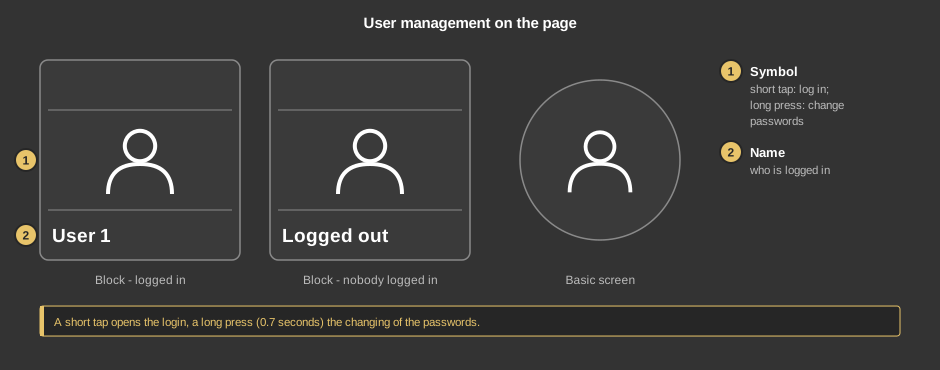
Block user controlWith this control element users log in to and out of the APP. Depending on the user, different pages can be reached – for instance only light and shading for a guest. See User administration.
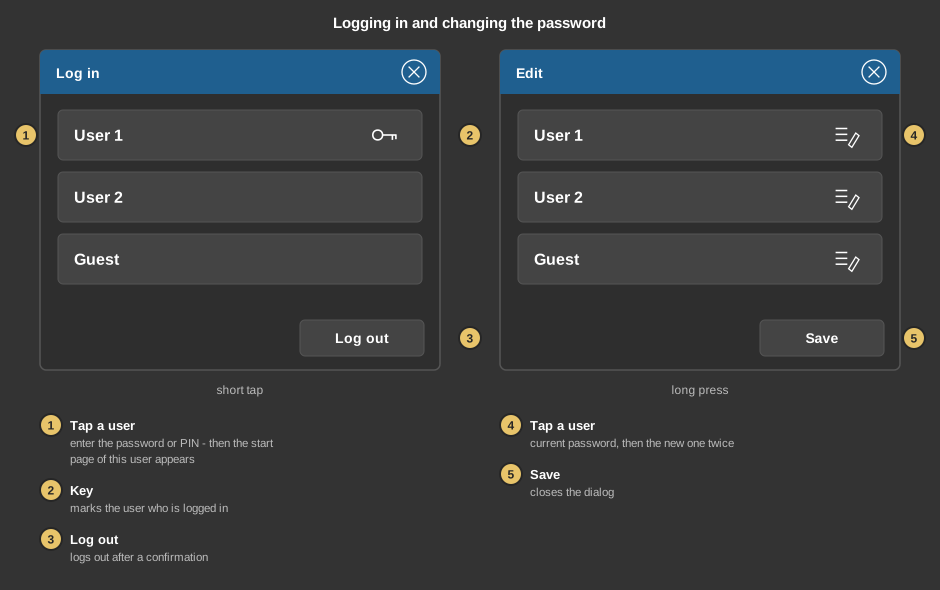
With more than four users the list can be scrolled. At most as many users appear as the licence allows; if this number is reached, the title bar says so.
This section is meant for the installer of the system.
The users and their passwords are created in the Studio, as well as which pages belong to which user, see User administration and the video about it. An own icon can also be assigned to each user there.
Tip: If a fixed start page is set in the project, it always takes precedence over the first page of the user after logging in. So do not set a fixed start page when the user management is used.
Display |
|
| View | Block or Basic screen. The third choice List (obsolete) comes from older projects and should no longer be used. |
Password |
|
| PIN | Optional, four digits. Asked for on a long press before the dialog Edit appears. Empty: the dialog appears without a question – the current password of the respective user is still required. |
| Allow logout | Shows the button Log out in the login. Default on. |
User |
|
| User administration | The button ... opens the User administration dialog without going through the Project menu. |
See also General properties of all control elements.