Block Ventilation
This control element operates a ventilation system – either the controlled
residential ventilation of the whole house or a single exhaust fan, for
instance in the bathroom. It shows whether and how strongly the system
ventilates, lets it run on demand or holds it at a fixed stage, and reminds
you of the due filter change.
Operation
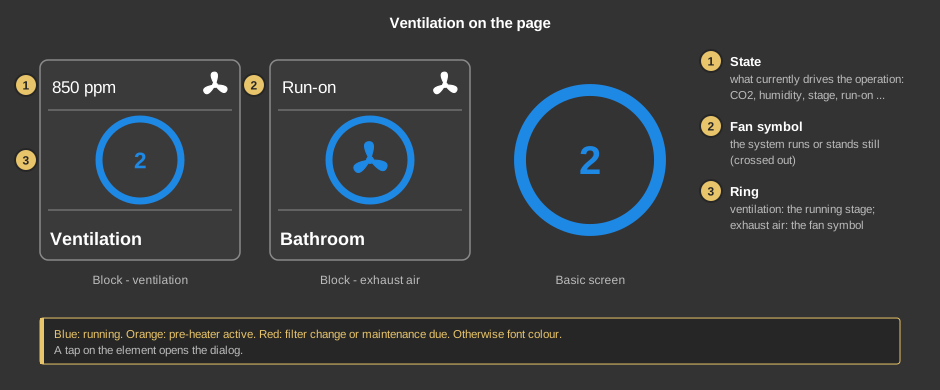
- State: what currently determines the operation. For the
ventilation this is the CO2 value in ppm or the humidity in % if one of them
requests the stage, otherwise Stage 1 to Stage 4 or
Off. Replace filter, Locked, Boost ventilation
and Humidity protection take precedence. For the exhaust air it reads
Off, On, Humidity, Humidity rise,
Run-on or Maintenance due.
- Fan symbol: the system runs; when it stands still, the symbol is
crossed out.
- Ring: for the ventilation the centre shows the running stage (0
when it stands still), for the exhaust air the fan symbol. Blue means
running, orange: the pre-heater is active against frost, red: filter change
or maintenance due. When the system stands still, the ring has the font
colour.
As a circle (basic screen) the element only shows the ring. A tap on the
element opens the dialog.
Exhaust air: The tile has a switch at the bottom right. A tap
on it switches the fan on or off immediately without opening the dialog
– with the same behaviour as the button in the dialog. A tap on the rest
of the tile opens the dialog. On a small tile without a footer the fan symbol
switches. On the basic screen (circle only) a short tap switches, the dialog
opens with a long press.
The dialog – ventilation
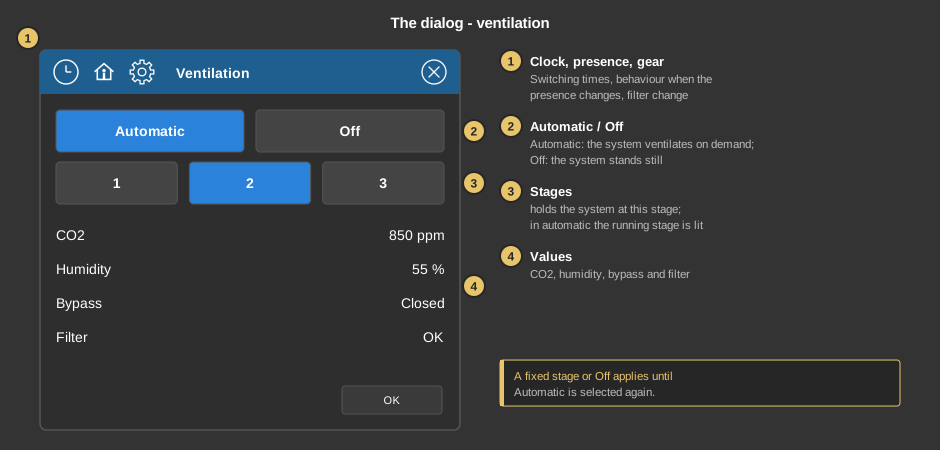
- Symbols of the title bar: clock (switching times), house
(presence) and gear (filter change), see below. Next to them is the name of
the system.
- Automatic / Off: Automatic lets the system ventilate on
demand – according to CO2, humidity and the base stage of the presence
state. Off stops it.
- Stages: holds the system at this stage. There are as many buttons
as stages. In automatic the stage the system is currently running at is
lit.
- Values: CO2 in ppm, humidity in %, the bypass (Open or
Closed) and the filter (OK or Replace).
Every tap takes effect immediately. A fixed stage or Off applies until
automatic is selected again – by the button, a switching time or the
presence. OK closes the dialog.
The dialog – exhaust air
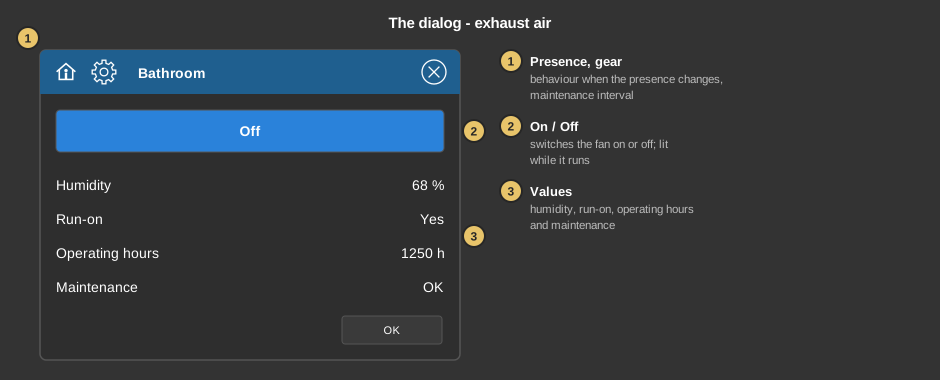
- Symbols of the title bar: fan (operation), house (presence) and
gear (maintenance). The exhaust air has no switching times.
- On / Off: a single button. When the fan stands still it reads
On and starts the fan for the duration after manual switch-on, or
for the run-on time if that is not set. While the fan runs, the
button is lit and reads Off; a tap switches the fan off immediately.
It then stays off until no request (light, motion, humidity) is pending any
more.
- Values: humidity in %, whether the run-on is active, the operating
hours and the maintenance (OK or Due).
Operation of the exhaust air
The fan symbol opens the values that determine how the exhaust air
operates. All values only take effect with Save.
- Humidity threshold, hysteresis, humidity rise: at which humidity
the fan starts, how far it must drop before the fan switches off again, and
by how much it may rise within ten minutes (off = no rise
detection).
- Run-on time: the fan keeps running this long after light or
motion have disappeared.
- After manual switch-on: the fan runs this long after it was
switched on with the button On; then it switches itself off again.
With like run-on the run-on time applies.
- Cycle operation: On lets the fan alternately run and pause
at high humidity, for example 30 minutes Cycle on and 30 minutes
Cycle off. The two times only appear while cycle operation is on.
Light, motion and the button On also apply during the pause. The
display then shows Cycle or Cycle pause.
As long as nothing was saved here, the parameters of the function block
apply. Afterwards the values set here apply.
Filter change and maintenance
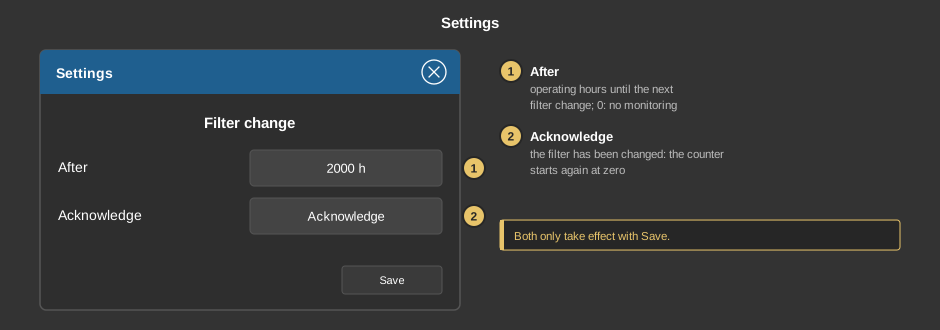
The gear opens the settings; the heading reads “Filter change” for the
ventilation and “Maintenance” for the exhaust air.
- After: after this many operating hours the filter change or the
maintenance becomes due; the element then turns red. off (0)
switches the monitoring off.
- Done: tap the button Acknowledge after the change – the counter starts again at
zero and the message disappears.
Both only take effect with Save; the cross discards the change.
Switching times and presence
Behind the clock (ventilation only) are switching times that set the
same as the buttons: Automatic, a fixed stage or Off –
for example stage 2 in the evening and back to automatic at 22:00. A tap on
the value steps through them. Everything else about switching times is
described under Presence.
Behind the house it is set what happens when the presence changes. A
tap on the symbol of a state switches the setting on or off, a tap on the
value next to it steps it on: for the ventilation Automatic, stage 1 up to
the highest stage or Off, for the exhaust air Enabled or
Locked (the fan must not start in this state). Without a setting the
change does nothing; that is the default. A common choice is “Holiday:
Off”.
Setup
This section is meant for the installer of the system.
The control element works with two function blocks:
Block Ventilation for a
controlled residential ventilation and
Block Exhaust
air for a single exhaust fan. First create the function block together
with its addresses, then right-click the control element and choose the
function block. The control element recognises by itself which of the two
is linked; display and dialog adapt accordingly. The addresses are taken
over, the text of the tile gets the name of the block. Without a link, a tap
on the element points this out.
- The number of stage buttons follows the number of stages at the function
block Block Ventilation.
- The buttons write to input SV (set stage) of the block Block
Ventilation; with Block Exhaust air the button acts like a press on input
TA (push button).
- The maintenance interval is set in the control element, not at the block
– so the user can also change it in the app.
Parameters
| View |
Block or Basic screen. The choice
List comes from older projects; it only appears if it is already
set. |
| Text |
Caption of the tile and of the dialog, default
“Ventilation”. When linking, the name of the function block is taken
over. A line break is inserted with \n. |
Address links
All addresses are located at the function block
Block Ventilation or
Block Exhaust air
and are taken over when linking.
See also General properties of all control
elements.