 Block Weather station display
Block Weather station display
Block Weather station displayThis control element shows the values of a weather station at a glance: the outdoor temperature, a symbol for the weather situation and up to three further values, for example wind, brightness or air pressure. It is for display only. If the weather station is also to control wind, rain and frost alarms or the shading, the control element Block Weather station is the better choice.
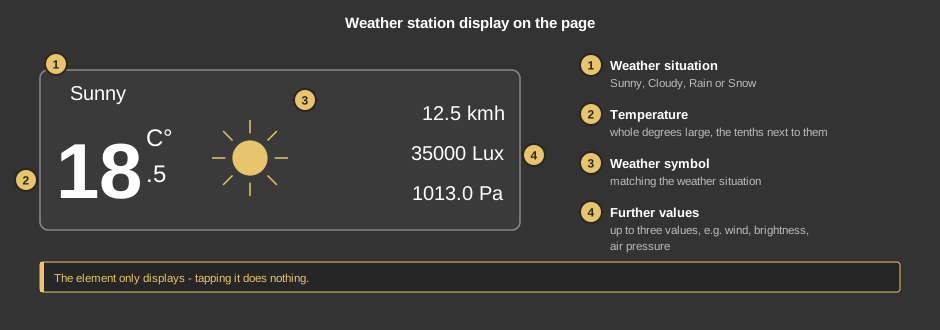
The element has no dialog – tapping it does nothing.
This section is meant for the installer of the system.
The variables are linked directly at the control element, no function block is needed. The values come for example from a weather station on the bus or from the function block Weather station. The control element is wider than it is high; its size can be set freely.
Display |
|
| Cloudy below | Brightness in lux below which “Cloudy” is shown; from this value on “Sunny” applies. Default 5000 lux. |
| Format Value 1 | Presentation of Value 1, default %.1f kmh. See Format. |
| Format Value 2 | Presentation of Value 2, default %d Lux. |
| Format Value 3 | Presentation of Value 3, default %.1f Pa. |
| Temperature | Outdoor temperature in °C. If it is below 1 °C while it rains, snow is shown. Not linked: 0 is shown. |
| Brightness | Brightness in lux. Below “Cloudy below” Cloudy is shown, otherwise Sunny. Not linked: the brightness counts as 0, so Cloudy is always shown. |
| Rain | Optional. Rain message: not equal to 0 means rain (or snow), 0 dry. Not linked: no rain is shown. |
| Value 1 to Value 3 | Optional. Any values, presented with the respective format. Not linked: the line is left out. |
See also General properties of all control elements.